
Nano Banana Pro Full Guide: Everything You Need to Know
The world of AI image generation has just received a powerful new contender. In November 2026, Google DeepMind unveiled Nano Banana Pro, a state-of-the-art model built upon the formidable Gemini 3 Pro architecture. This release marks a significant evolution from the previous Nano Banana (based on Gemini 2.5 Flash), shifting the focus from generating “fun” images to becoming a serious productivity tool for commercial and professional design. It promises to tackle long-standing frustrations like garbled text and inconsistent characters while offering unprecedented control over visual composition. Whether you are a marketer, designer, content creator, or developer, this Nano Banana Pro full guide will provide you with everything required to understand, access, and master this groundbreaking tool.
What’s Nano Banana Pro? Essential Features to Know
Nano Banana Pro is more than just an image generator; it’s an advanced reasoning and visualization engine. Its core mission is to transform complex ideas into high-fidelity visual assets with precision and consistency.
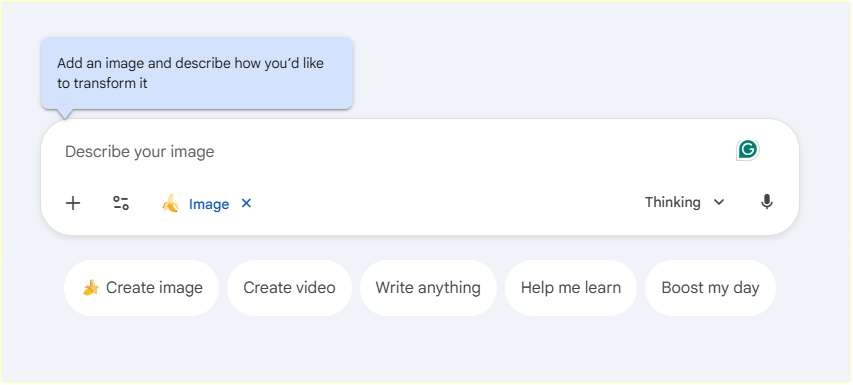
- Unmatched Text Rendering: One of its most celebrated breakthroughs is solving the problem of garbled text, especially in languages like Traditional Chinese. The model can generate clear, accurate text in multiple languages, fonts, and styles directly within images. This makes it ideal for creating posters, product mockups, and informational graphics without needing post-editing.
- Professional-Grade Control: It grants users studio-level control over their images. You can specify and adjust camera angles, scene lighting, depth of field, focus, and color grading, moving beyond simple prompts to true creative direction.
- Superior Consistency with Reference Images: A game-changer for brands and serialized content, Nano Banana Pro can maintain character and style consistency by analyzing up to 14 reference images. This allows a designer to lock in a brand’s visual identity, ensuring a model or mascot looks identical across various scenes and settings.
- High-Resolution & Multi-Format Output: It natively supports outputs up to 2K and 4K resolution, catering to needs ranging from social media to professional print materials. Furthermore, it can intelligently adapt a single visual concept into multiple aspect ratios, saving hours of manual cropping and reformatting.
- Integrated Web Search & Knowledge: Leveraging Gemini 3’s capabilities, the model can pull in real-time information from Google Search. Ask it to create a visualization of today’s weather, a summary of a sports event, or step-by-step recipe cards, and it will generate accurate, informative content.
How to Use Nano Banana Pro for Free
A common question in any comprehensive Nano Banana Pro user guide is about free access. While full, unlimited use typically requires a subscription, there are several legitimate ways to experience its capabilities at no cost.
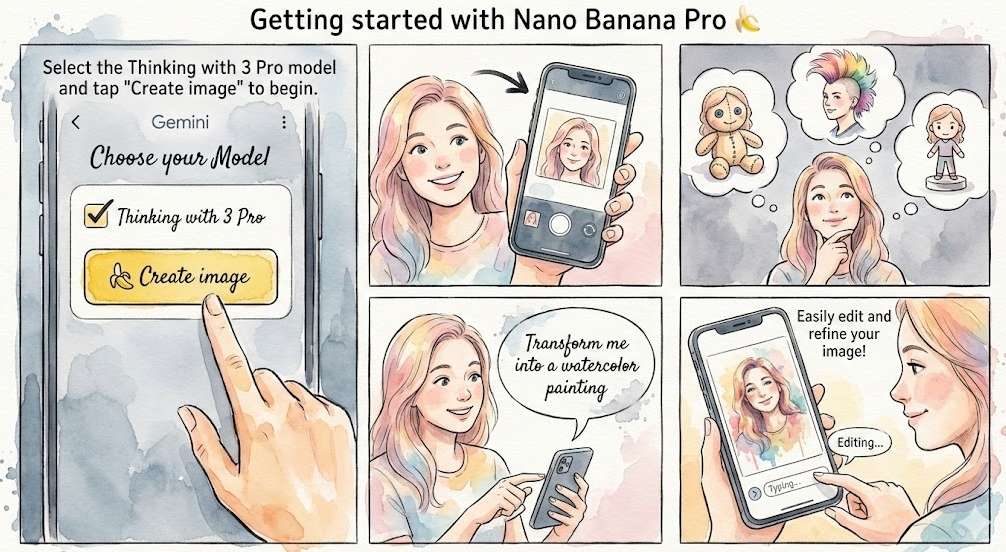
- Through Official Google Channels: The model is being rolled out globally within the Gemini app (chat interface). Free-tier users receive a limited number of generations per day before the system reverts to the standard Nano Banana model. It’s crucial to note that due to overwhelming demand, Google has adjusted these free limits. As of late November 2026, free users can typically generate or edit around 2 images per day with Nano Banana Pro, a reduction from earlier, more generous allowances. Check the comprehensive guide on how to use Nano Banana Pro for free.
- Via Partner Platforms (Limited-Time Offers): Some integrated platforms offer promotional free access. For instance, CapCut has provided time-limited free trials of Nano Banana Pro within its AI Design tool, sometimes including a set number of daily credits. Always check the current terms on such platforms, as offers can change.
- Student Programs: In some regions, like Taiwan, university students have been offered a one-year free trial of Google AI Pro, which includes higher Nano Banana Pro limits.
Important Note: Be wary of third-party websites claiming to offer “free” access outside these official and partnered pathways. For a stable and secure experience, sticking to Google’s ecosystem or reputable partners like CapCut is recommended.
How Much Is Nano Banana Pro? Pricing Breakdown
Understanding “how much does Nano Banana Pro cost” depends entirely on your access method and usage volume. Here’s a clear breakdown:
1.Subscription Tiers within Google AI:
- Free Tier: As mentioned, offers very limited daily usage.
- Google AI Plus/Pro/Ultra: These paid subscriptions provide significantly higher generation limits. For example, Google AI Ultra subscribers not only get more generations but also receive images without the visible Gemini watermark, which is crucial for professional work. Exact limits per tier are not publicly detailed but scale with the subscription cost.
2.Pay-Per-Generation via API: For developers and high-volume users, the cost is calculated per image. This is where a significant price increase over the previous model is evident:
- Standard Nano Banana (1024×1024 px): ~$0.039 per image.
- Nano Banana Pro (1080p/2K): $0.139 per image.
- Nano Banana Pro (4K): $0.24 per image.
The table below summarizes the key access points and their associated costs to help you decide the best path.
Nano Banana Pro API Cost
For businesses building applications, the Nano Banana Pro API cost is a critical operational factor. The official pricing via Google’s Gemini API is as stated above: $0.139 for a 2K image and $0.24 for a 4K image.
However, an interesting market dynamic has emerged. Third-party platforms that aggregate AI models often offer different rates. For instance, during a recent promotional period, the platform Higgsfield.ai offered access to Nano Banana Pro at a remarkably low rate of $0.058 per generation. Other creative platforms like Freepik and Artlist listed it at $0.22 and $0.48 per generation, respectively. This indicates that shopping around different AI service aggregators can sometimes yield better value than going directly to the API, depending on your volume and needs.
Nano Banana Pro Limits: Key Restrictions Explained
Being aware of the Nano Banana Pro limits is essential for planning your projects. These restrictions apply primarily to the consumer-facing access through Gemini:
- Usage Quotas: The most significant limit is the daily generation quota. Free users face the strictest cap (now approximately 2 images/day), while paid subscribers have higher, undisclosed limits. These quotas are subject to change based on server capacity and demand.
- Watermarks: Images generated by free and Google AI Pro users contain a visible Gemini star icon watermark. Only Google AI Ultra subscribers and users of the Google AI Studio developer tool receive clean, watermark-free outputs.
- Content Safeguards: Like all major AI models, it has built-in safety filters to prevent the generation of harmful, violent, or explicit content.
- Functional Limits in Specific Tools: Access can be gated in integrated tools. For example, in NotebookLM, the ability to create infographics and slides with Nano Banana Pro was temporarily restricted for free users and limited for Pro subscribers following the model’s surge in popularity.
Best Nano Banana Prompts for Better Results
To move beyond basic results, treat Nano Banana Pro like a collaborative human designer. Here are expert tips, drawing from official guidelines:
- Use Conversational Refinement: Don’t start over from scratch. If an image is 80% right, give instructions like, “Keep the main character, but change the background to a rainy city street at night“.
- Write in Complete, Descriptive Sentences: Replace keyword lists with vivid descriptions. Instead of “cat, sofa, 4K, cute,” try: “A ginger tabby cat is curled up asleep on a cream-colored knit sofa, with soft afternoon light streaming through Venetian blinds creating striped shadows, in a warm, peaceful, close-up photograph style“.
- Specify Context and Use Case: Tell the AI why you need the image. “Generate a visual for a university lecture slide explaining neural networks, using a whiteboard-style drawing with blue and orange color-coding for different components“.
- Leverage Its Unique Features: Directly ask for what it does best. Prompt it to “generate text on the packaging in Spanish” or “maintain the exact same woman’s face across these three different magazine cover scenes.”
- Explore More Nano Banana Prompts for Faster, Smarter AI Outputs>>>
Nano Banana Pro Competitors You Should Know
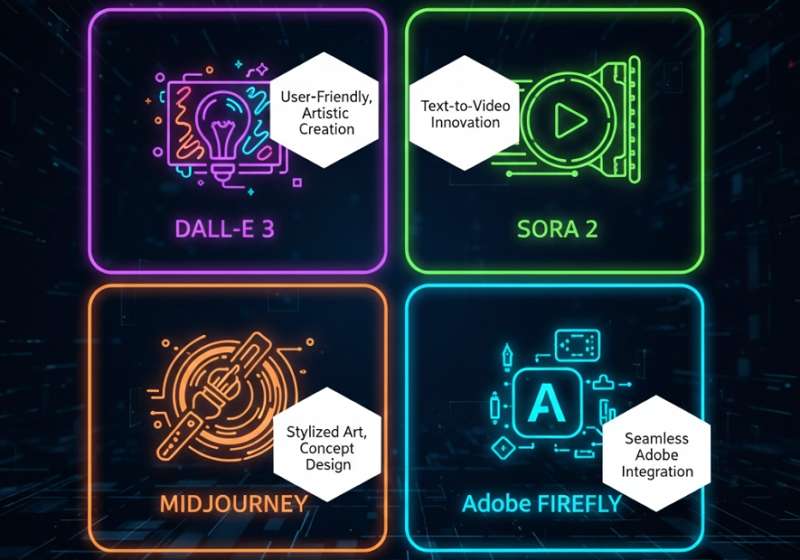
While powerful, Nano Banana Pro exists in a competitive landscape. Here are three key alternatives:
- OpenAI’s DALL-E 3 & Sora 2: Integrated into ChatGPT, DALL-E 3 is incredibly user-friendly and excels at creative and artistic interpretations. For video, Sora 2 is its groundbreaking text-to-video model, representing a different modality.
- Midjourney: Still the gold standard for artistic quality, stylistic range, and community-driven creativity, especially for digital art, concept design, and highly stylized imagery.
- Adobe Firefly: Deeply integrated into the Creative Cloud suite (Photoshop, Illustrator). Its biggest strength is seamless workflow integration for existing Adobe users, offering generative fill, vector recoloring, and templates trained on licensed, ethically-sourced imagery.
- Explore more Nano Banana Competitors
Key Differentiator: Nano Banana Pro’s edge lies in its deep integration with Google’s knowledge graph, superior multi-language text rendering, and robust consistency features—making it particularly strong for data-driven, commercial, and multi-format marketing content.
Troubleshooting Nano Banana Pro: Common Issues
- “I can’t find Nano Banana Pro in my Gemini app.” Ensure your app is updated. The rollout is global but progressive. Switching your account language/region and restarting the app can sometimes help.
- “My outputs are blurry or soft.” This often stems from vague prompts. Increase specificity regarding materials, lighting, and camera details. Also, confirm you are requesting a high-resolution output (2K/4K) and not upscaling a low-res base image.
- “The character’s face isn’t staying consistent.” Make full use of the reference image feature. Upload multiple (up to 14) clear, high-quality images of the subject from different angles to “train” the model on the specific identity.
- “I hit my daily limit immediately.” This confirms you are using the free tier’s strict quota. For continuous work, a paid subscription is necessary.
- “Is the service down?” If you encounter a complete failure to generate images, persistent errors, or an outage, it might be a rare platform service issue. Before taking other steps, you can first check our dedicated guide Nano Banana Pro Is Down? Troubleshooting Tips & Fixes to learn how to confirm service status, find official announcements, and perform initial troubleshooting.
Final Thoughts
Nano Banana Pro represents a maturation of AI image generation, prioritizing precision, control, and professional utility over mere novelty. Its ability to handle text, maintain consistency, and produce ready-to-use marketing assets positions it as an invaluable tool for businesses and serious creators.
The decision to adopt it hinges on your specific needs. If your work revolves around creating branded marketing materials, data visualizations, or multi-format content with precise textual elements, mastering Nano Banana Pro through this full guide will be a worthwhile investment. Consider starting with the free tier to test its capabilities, and if it aligns with your workflow, evaluate the subscription or API options to unlock its full potential and bypass the stringent limits. As the AI landscape evolves, tools that seamlessly blend advanced reasoning with creative execution, like Nano Banana Pro, are set to define the future of professional content creation.

 English