Klap Review 2026: The Best AI Video Clip Generator?
Recording long-form videos — whether it is a 60-minute podcast, a technical webinar, or an in-depth YouTube tutorial — takes significant time and effort. However, growing an audience today requires a consistent presence on short-form video platforms like TikTok, Instagram Reels, and YouTube Shorts. Manually combing through hours of footage to find hook-worthy moments, cropping videos to a 9:16 aspect ratio, and adding synchronized captions can swallow an entire work week.
Klap aims to automate this tedious post-production bottleneck. Using advanced generative AI algorithms, Klap analyzes long video files or YouTube links, extracts contextually complete highlights, reframes the subjects, and formats them into ready-to-publish short clips. In this review, we examine Klap’s capabilities, feature set, competitor standing, and pricing to determine if it belongs in your content creation stack.
What Is Klap and How Does It Work?
Klap is a web-based AI video clip generator designed to streamline AI video repurposing for digital content creators and marketing teams. Rather than relying on simple timestamp intervals, Klap uses multi-modal AI to evaluate speech patterns, topic shifts, and contextual cues within your footage.
The workflow begins when you upload a local file or input a public YouTube URL. Klap processes the content, transcribes the spoken audio, and extracts logical segments that work as standalone narratives. The platform automatically formats the video for vertical viewing, attaches customizable dynamic captions, and generates a score estimating the engagement potential of each clip. It caters to podcasters, interviewers, keynote speakers, educators, and product reviewers looking to scale their video presence without expanding their editing team.
Key Features That Make Klap Worth Considering
Klap combines automation with user control, focusing on output quality and narrative context.
1. AI-Powered Content Curation and Video Clipping
Traditional automated editing tools often cut videos mid-sentence or capture fragments that lack context. Klap’s algorithm prioritizes narrative structure. It identifies distinct topics within long-form footage, ensuring that each generated clip features a clear hook, an informative middle section, and a natural conclusion. This makes the tool effective for long video to short video conversion where context matters.
2. Automatic Reframing and Active Speaker Detection
Converting horizontal 16:9 video into vertical 9:16 shorts usually requires manual keyframing to keep speakers in frame. Klap’s active speaker detection tracks faces and focal points automatically. When multiple speakers converse in a podcast or interview, Klap pans and switches focus smoothly, maintaining optimal framing for mobile screens without manual keyframe adjustments.
3. AI-Generated Captions and Subtitle Customization
With over 80% of mobile users watching short-form content with the sound off, clear captions are essential. Klap generates AI-generated captions with high accuracy across multiple supported languages. Users can select from customizable font styles, colors, animations, and highlight rules to match their brand identity.
4. Virality Score and Built-in Video Editor
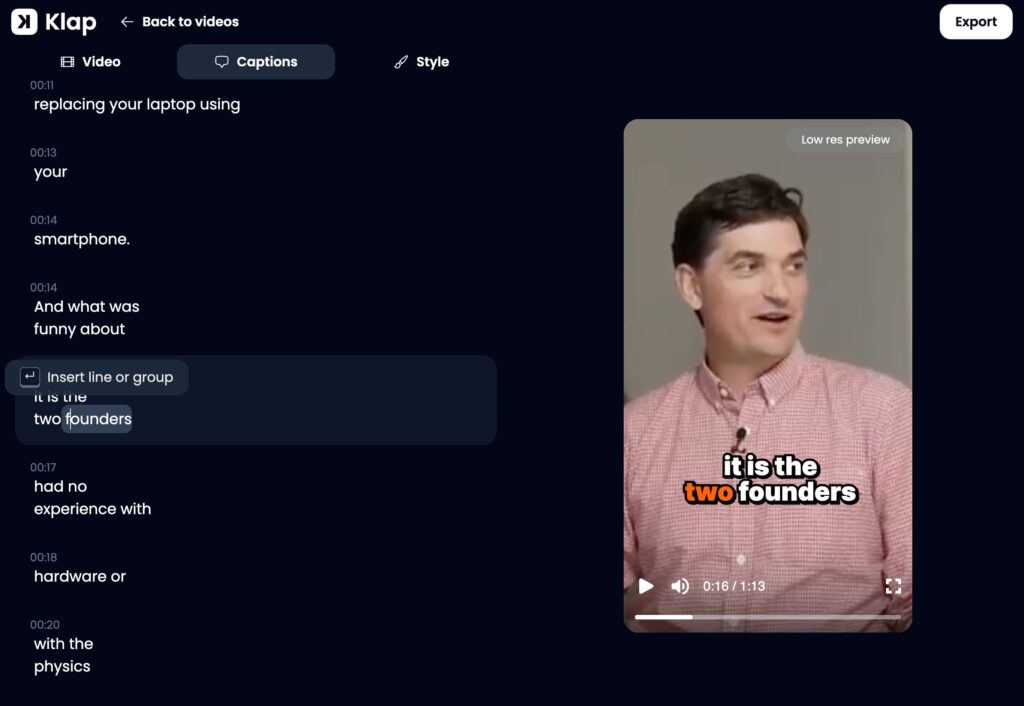
To streamline content selection, Klap assigns a virality score to each generated highlight based on pacing, hook strength, and topic relevance. While creators retain final editorial control, these scores help prioritize which clips to edit first. The platform also includes an intuitive built-in editor that allows users to adjust clip start and end points, tweak caption text, modify framing, and swap template styles.
5. Social Media Publishing, Scheduling, and Analytics
Beyond editing, Klap functions as a social distribution portal. Content teams can connect their social channels to publish finished clips directly or schedule them for future release across TikTok, Instagram, and YouTube. Built-in performance tracking allows creators to monitor view counts and engagement metrics directly within the Klap dashboard.
How to Use Klap to Turn Long Videos Into Shorts
Creating short-form content with Klap follows a straightforward five-step process:
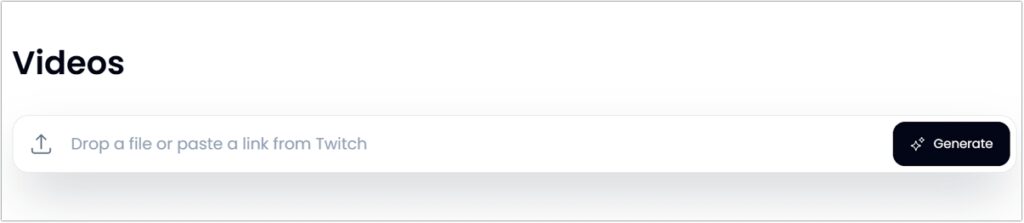
Step 1. Import Source Content: Paste a public video link or upload a local video file directly into the Klap dashboard.
Step 2. Configure Generation Settings & AI Analysis: Click the Generate button, select your source language (e.g., English), pick a dynamic caption style from the quick start presets or your custom templates, and set optional auto-posting preferences. Klap will analyze the audio transcript, detect visual cues, and identify key highlights.
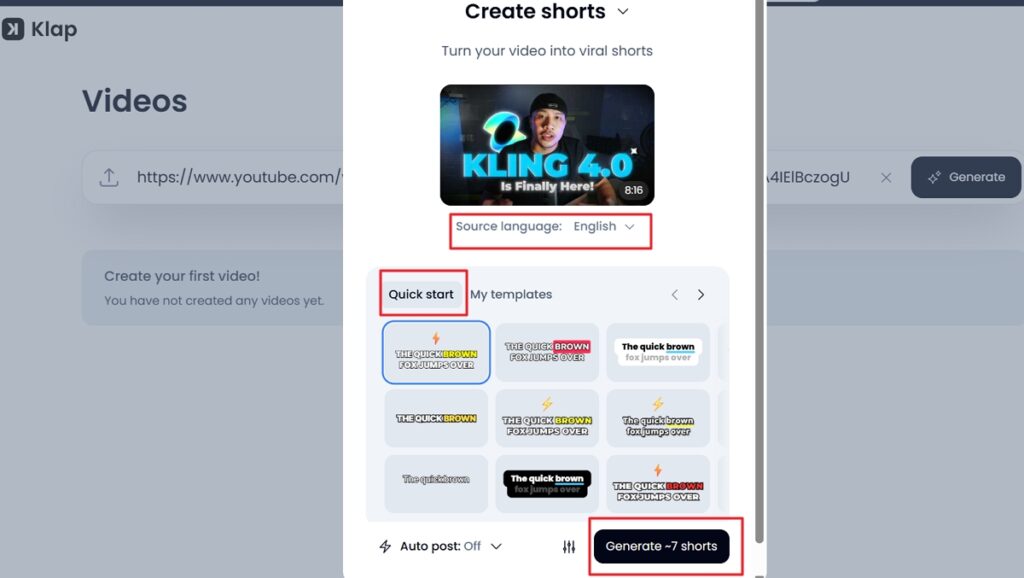
Step 3. Start Generating Clips: Click the Generate shorts button (which displays the estimated output, such as Generate ~7 shorts) to let Klap’s AI analyze transcript context, track active speakers, and extract the best highlights.
Step 4. Export or Schedule: Download high-resolution MP4 files to your device, or publish them directly to linked social media accounts.
Klap vs. Opus Clip vs. Vizard: How Does It Compare?
The AI video clipping tool market includes several established competitors, most notably Opus Clip and Vizard. Understanding Klap’s market position helps determine which platform suits your specific workflow.
| Feature / Metric | Klap | Opus Clip | Vizard |
| Primary Focus | High context-aware clips & clean UI | High-volume clip generation & virality scoring | Multi-layout editing & video repurposing |
| Speaker Tracking | Smooth auto-reframing | Dynamic speaker cropping | Standard subject framing |
| Caption Control | Highly customizable templates & styles | Animated visual captions | Standard caption overlays |
| Direct Publishing | Supported with scheduling & analytics | Supported | Supported |
| Editing Flexibility | Intuitive clip & caption tweaking | Scene-level adjustments | Timeline-based editing workspace |
While Opus Clip emphasizes high-volume processing and granular virality metrics, Klap differentiates itself through contextual clip accuracy and clean output rendering. Vizard offers a broader, timeline-heavy editing interface, whereas Klap maintains a streamlined dashboard focused on speed and simplicity.
Klap Pricing: Is It Worth the Investment?
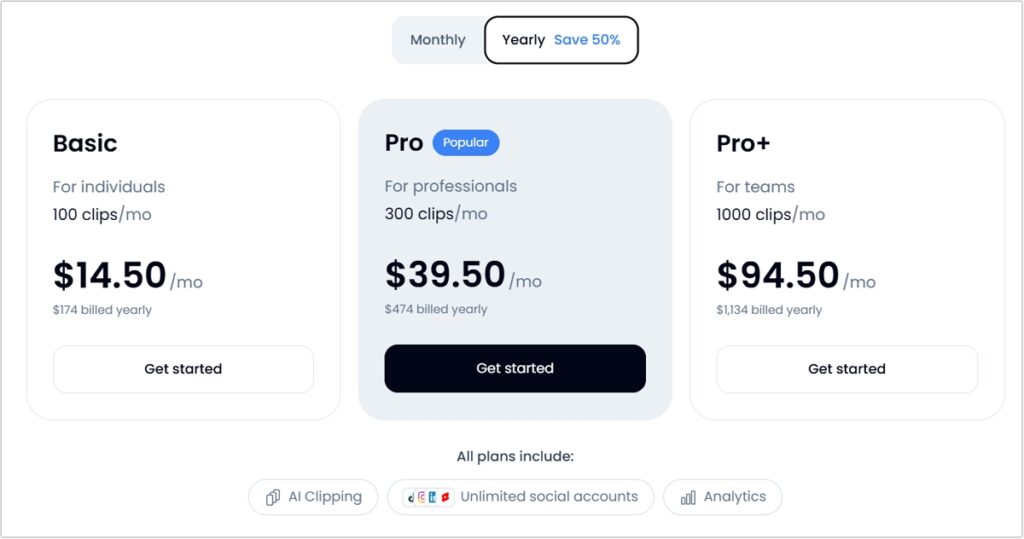
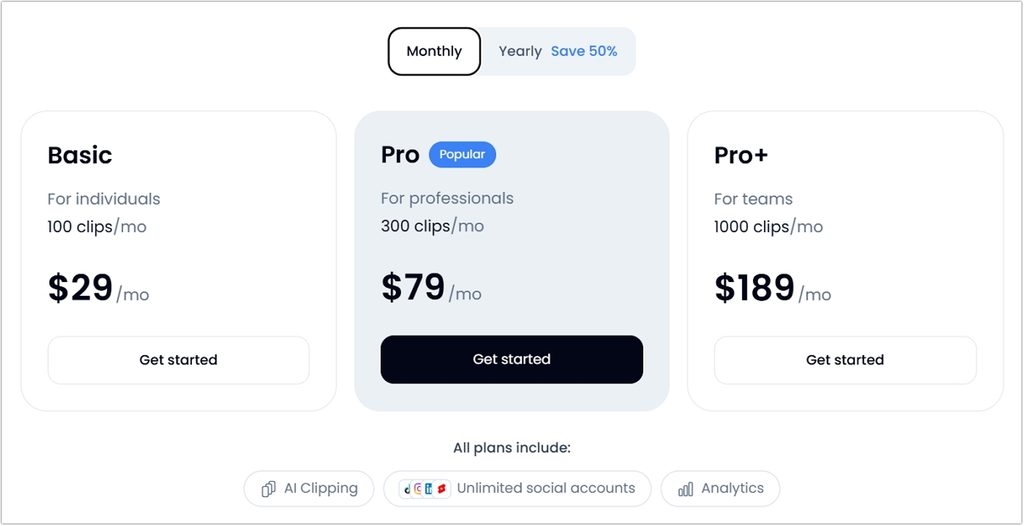
Klap offers a straightforward tier structure based on the number of generated clips per month rather than limiting source video hours. This makes its pricing predictable for creators who produce long-form content regularly. All paid plans include core features like active-speaker reframing, animated captions, virality scoring, multi-language support (99+ languages), and direct social media publishing without watermarks.
Free Trial and Billing Flexibility
Klap provides a no-risk free trial that allows users to process 1 source video without entering credit card details. This lets creators evaluate transcription accuracy and reframing quality before purchasing a plan. To download HD files or publish clips directly to social channels, users must upgrade to a paid subscription. Annual billing offers a 50% discount across all tiers, and yearly subscribers get their full year’s clip allocation up front (e.g., 1,200 clips upfront on the Basic annual plan).
Value Assessment
For a creator publishing 3 to 4 long podcasts per month and extracting 15 to 20 shorts per episode, the Basic Plan ($14.50/mo billed annually or $29/mo monthly) provides more than enough capacity. Compared to hiring a video editor (which often costs 25–50 per short clip), Klap reduces post-production costs dramatically, making it a highly cost-effective investment for solo creators and digital marketing teams alike.
For exact, up-to-date plan details and current promotions, visit the official Klap Pricing page.
Klap Pros and Cons
Pros
- Saves hours of manual editing and re-encoding.
- Context-aware clipping maintains logical narrative hooks.
- Accurate multi-language transcription and animated caption overlays.
- Seamless auto-reframing keeps active speakers centered on mobile screens.
- Integrated social scheduling reduces reliance on third-party publishing tools.
Cons
- AI-generated transcripts still require occasional manual proofreading for technical terms or names.
- Output quality remains dependent on clear source audio and structured speaking.
Final Verdict: Who Should Use Klap?
Klap is a practical asset for content teams looking to scale video output without increasing production overhead. It is ideal for podcasters, webinar hosts, agency marketers, and YouTubers who generate long-form spoken video and need an efficient TikTok video maker or Instagram Reels creator.
While film editors requiring frame-accurate color grading or multi-track audio compositing will still rely on traditional desktop suites, creators seeking fast, reliable, and intelligent video repurposing will find Klap a strong addition to their tech stack.
To see how the platform handles your footage, test out the free trial on the official Klap website.
 English