
How to Use Nano Banana Pro for Free: Simple Steps Revealed!
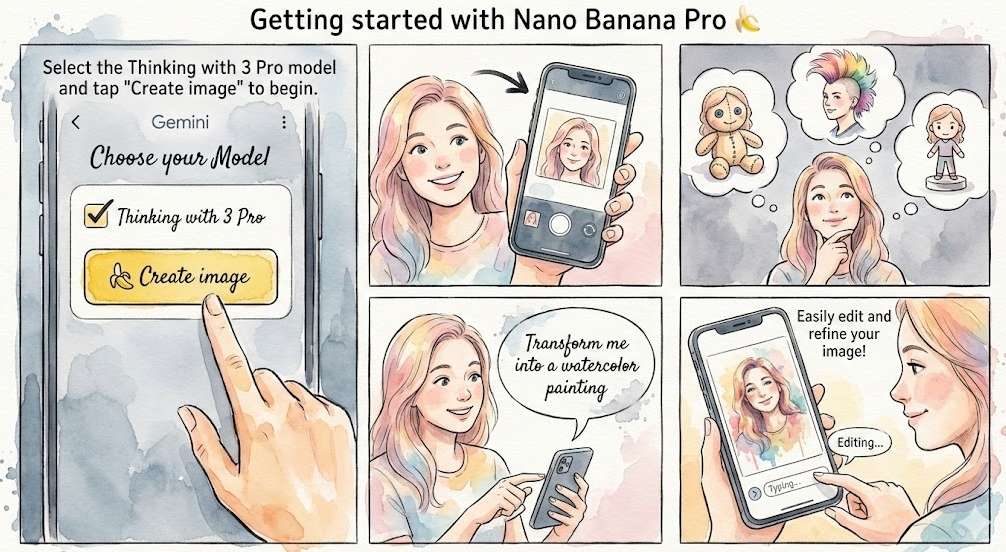
Free access to Nano Banana Pro is possible, primarily through limited daily credits on platforms like Google’s Gemini or integrated third-party services. The exact free allowance is highly variable and frequently adjusted by providers in response to server demand. As of late November 2026, the direct free tier on Google Gemini has been reduced to generating just two images per day. The most straightforward method for how to use Nano Banana Pro for free is to access it through its official implementation within the Gemini app or website.
Google’s Nano Banana Pro has taken the AI world by storm, quickly becoming a benchmark for image generation quality. Its ability to create stunningly realistic visuals, render readable text, and maintain character consistency has made it a coveted tool for creators and marketers alike. However, its premium capabilities come with questions about accessibility. Many are left wondering if there’s a legitimate way to experience this cutting-edge technology without a subscription. This guide will demystify the options, provide a clear, step-by-step path to free access, and show you how to maximize your results.
What is Nano Banana Pro? A Quick Overview of Its Features
Nano Banana Pro is not just another AI image generator; it’s a sophisticated model built on Google’s powerful Gemini 3 Pro foundation, designed to transform ideas into professional-grade visual assets. It moves beyond simple prompt-to-image conversion, focusing on practical, commercial applications like marketing materials, detailed infographics, and brand-consistent campaigns.
Here are the key features that set it apart:
- Superior Image Quality & Resolution: It generates images at a native 2K resolution and supports 4K upscaling, a significant leap from the standard 1024×1024 output of many models. This makes it suitable for print materials and high-definition digital displays.
- Exceptional Text Rendering: One of its most celebrated breakthroughs is the ability to generate clear, accurate, and stylized text within images. It supports multiple languages and fonts, effectively solving the “gibberish text” problem common in other AI art tools, which is a huge boon for creating posters or informational graphics.
- Advanced Character and Style Consistency: For brands and storytellers, it offers powerful control. You can upload up to 14 reference images to lock in a specific visual style, color palette, or character likeness. It can maintain consistency for up to five different characters across multiple generated images, ensuring your mascot or model looks the same in every scene.
- Context-Aware and Prompt-Sensitive: Leveraging Gemini 3 Pro’s reasoning, it excels at understanding nuanced prompts and real-world context. It can pull from web searches to create visualizations of current events or recipes, and it handles complex editing requests—like changing a scene from day to night or swapping a background—with a high degree of coherence
Is it Really Possible to Use Nano Banana Pro for Free?
Yes, but with critical caveats. The landscape of free access is dynamic and can change with little notice.
Officially, Google provides a limited free tier for Nano Banana Pro through its Gemini apps and website. Free users receive a small daily allowance of generations. However, due to overwhelming demand straining computational resources (“GPU is melting,” as one report noted), Google has recently tightened these limits. As of late November 2026, the free quota on Gemini has been adjusted downward to just two image generations per day. Google’s policy notes that this “limit may change frequently” based on demand.
Beyond the official source, third-party platforms that have integrated the Nano Banana Pro API sometimes offer alternative free or promotional access. For instance:
- CapCut: The popular video editor has integrated Nano Banana Pro into its AI Design toolkit. For a limited time, it offered users 10 free daily credits to generate images directly within its desktop or mobile app, with no credit card required.
- Third-Party AI Platforms: Some aggregated AI service platforms may offer free trials or bundled access to Nano Banana Pro as part of their subscription packages.
Crucial Consideration: Free access, whether through Google or a partner, is almost always subject to strict daily limits, regional availability, and can be withdrawn or reduced at any time. The goal for providers is to let users experience the tool’s value, ultimately encouraging a paid subscription for uninterrupted, high-volume use. Therefore, if you encounter an access error, it’s vital to diagnose the root cause before assuming your free tier is gone. Our companion guide, Nano Banana Pro Is Down? Troubleshooting Tips & Fixes, provides a step-by-step framework to distinguish between a service outage, a quota limit, or a local technical issue, helping you get back on track quickly.
How to Use Nano Banana Pro for Free
The most direct method to use Nano Banana Pro for free is through its native integration in Google’s ecosystem. Here’s how you can get started.
Method 1: Through Google Gemini (Official Free Tier)
This is the primary and most reliable free channel, though it currently offers the most restricted usage.
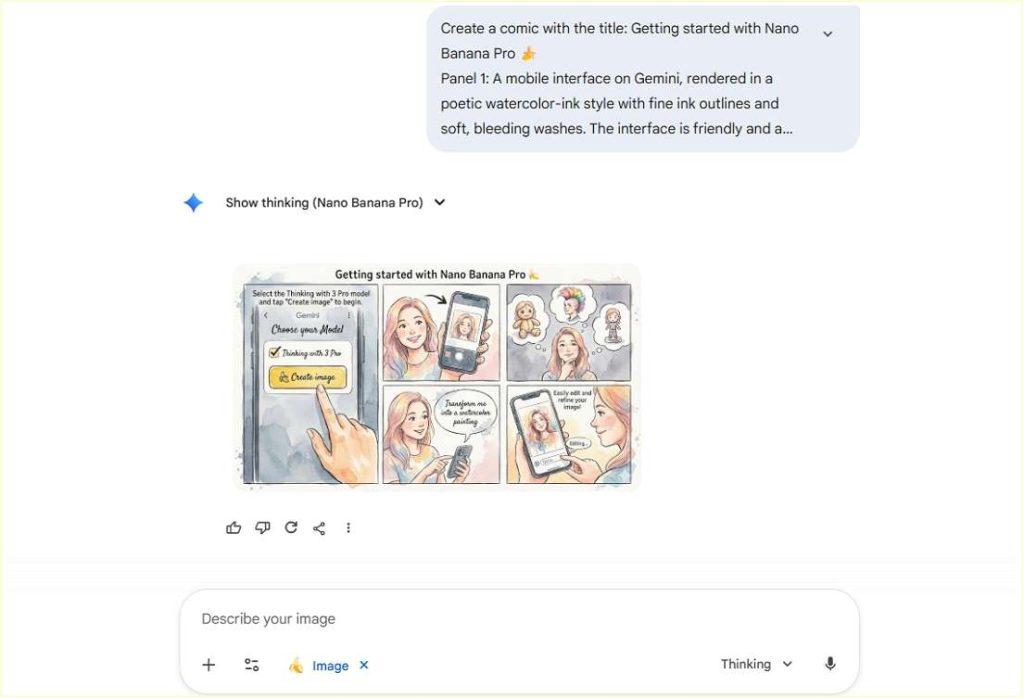
- Access the Platform: Open the Gemini website in your browser or launch the Gemini mobile app on your iOS or Android device.
- Sign In: Ensure you are signed in with your Google account. A free personal account is sufficient to access the basic tier.
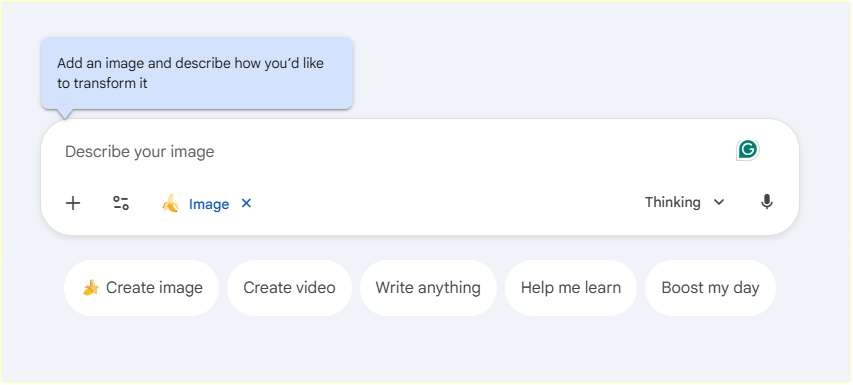
- Locate the Image Creation Tool: In the Gemini chat interface, Click the “Tools” button to find the “Create Image” option.
- Switch to the Pro Model (if necessary): The interface should allow you to select which model to use. Make sure you select or confirm that you are using “Nano Banana Pro” and not the standard version.
- Craft Your Prompt and Generate: Describe the image you want in the text box. Be as descriptive as possible for the best results (see the Pro Tips section below). Press the “Enter” key on your keyboard to start automatically generating your image.
- Monitor Your Usage: Your free daily quota (e.g., 2 images) will be consumed. The interface should indicate how many generations you have left for the day.
Method 2: Through Integrated Platforms like CapCut
Some creative software platforms offer temporary or promotional access. The steps for CapCut, as an example, are as follows:
- Open CapCut: Launch the CapCut desktop application or visit its website.
- Navigate to AI Design: In the main interface, find and click on the “AI Design” section, usually located on the left sidebar.
- Find Nano Banana Pro: Within the AI Design tools, browse the available AI image generation models. Nano Banana Pro should be listed among them.
- Start Creating: Enter your text prompt, adjust any available settings (like aspect ratio), and generate your image. CapCut’s integration is designed to be user-friendly, often with preset style options.
Pro Tips for Maximizing Your Free Nano Banana Pro Experience
With limited daily credits, making every generation count is essential. Here’s how to write prompts like a pro, based on insights from power users and official guidelines:
- Write in Complete Sentences, Not Just Keywords: Instead of “cat, couch, sunny,” try “A fluffy orange tabby cat is napping peacefully on a vintage velvet couch, bathed in a warm ray of afternoon sunlight streaming through a window.” This gives the AI rich context.
- Be Specific About Details: Specify the medium (photo, illustration, 3D render), lighting (studio softbox, golden hour, neon), camera details (shallow depth of field, 85mm lens), and mood (serene, energetic, mysterious).
- Use Iterative Refinement (Conversational Editing): Don’t waste a new credit if you’re 80% happy with an image. Use the edit function and give instructions like: “Keep the same woman and pose, but change her jacket to a leather one and set the scene in a rainy Tokyo street at night.“
- Provide Context for the Image’s Use: Tell the AI why you need the image. For example: “Create a minimalist product shot for a high-end skincare brand’s website, featuring a serum bottle on a marble background with dew drops, professional lighting.” This helps guide the style.
Common Pitfalls When Trying to Use Nano Banana Pro for Free
Navigating the free tier can be frustrating if you’re not aware of these common issues:
- The “Missing Feature” Problem: You might not see the Nano Banana Pro option. This can be due to regional restrictions, an outdated app version, or a gradual feature roll-out. Solution: Update your app, try switching your device’s language/region settings temporarily, or use the web version as a workaround.
- Inconsistent or “Soft” Output Quality: Free tiers might sometimes prioritize speed over the highest quality, or your prompt may be too vague. Solution: Use highly specific, descriptive prompts. If the image is good but slightly blurry, specify “4K resolution” or “photorealistic” in your request. Some platforms also have built-in “Upscale” or “Enhance” tools you can use after generation.
- Sudden Reduction or Loss of Access: As seen recently, providers can and do reduce free limits without much warning due to capacity issues. Have a backup plan, such as exploring the free alternatives listed later in this guide.
- Assuming Unlimited Access on Third-Party Sites: Be wary of platforms claiming “unlimited free” access. Always check the terms. Often, such offers are limited-time promotions for new users or tied to a broader subscription.
Conclusion
Learning how to use Nano Banana Pro for free is absolutely achievable, primarily through its official integration with Google Gemini, which provides a small number of daily image generations—currently just two per day. Partner platforms like CapCut have also offered limited free access as part of promotional integrations. The key is to manage your expectations: free access is a tasting menu, not an all-you-can-eat buffet. It’s designed to showcase the model’s remarkable capabilities—from generating print-ready marketing graphics to maintaining perfect character consistency—which often lead users to consider a paid plan for serious projects.
To make the most of your free credits, focus on crafting detailed, conversational prompts and use iterative editing. If the limits become a bottleneck, explore the vibrant ecosystem of open-source alternatives like Flux.2 or Z-Image, which provide powerful and truly free paths for AI image creation. Start by visiting Gemini today, use your free credits wisely, and experience firsthand why Nano Banana Pro is reshaping the visual content landscape.
Read More: Must-try Gemini Nano Banana Competitors >>>

 English