
Reve AI Image Generator: Create Stunning Art with Reve 1.0
The rise of artificial intelligence in the world of art has been nothing short of revolutionary. With AI-powered tools, creating beautiful and intricate artworks has become more accessible than ever. One such tool that has garnered significant attention is the Reve AI Image Generator. This innovative tool is designed to help users generate stunning and unique images with ease, making it a game-changer for both amateur and professional artists alike. In this article, we’ll take a closer look at Reve AI, its standout features in Reve 1.0, and how you can use it to create your own impressive artwork.
What is Reve AI?
At its core, Reve AI is an advanced image generation tool that leverages the power of artificial intelligence to create high-quality, detailed artwork. The Reve Image Generator is part of the broader trend of AI-assisted art creation, which has taken the creative world by storm in recent years. Reve AI stands out due to its ability to generate images quickly without compromising on quality.
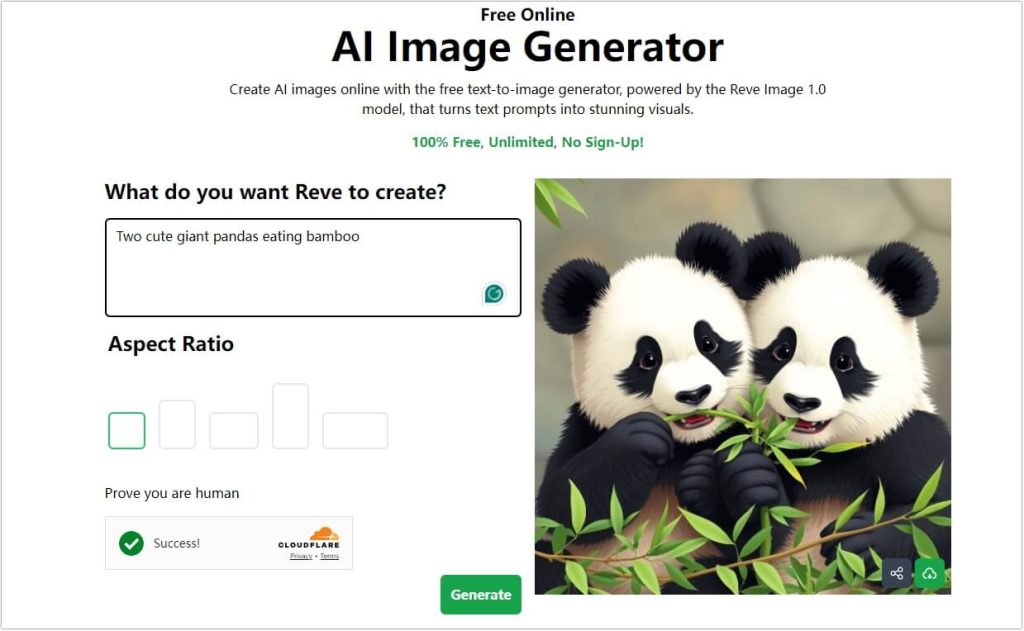
The Reve AI generator is built on cutting-edge deep learning models that can analyze user input and transform it into visually captivating art pieces. Whether you’re looking for abstract designs, landscapes, or portraits, Reve AI offers versatility that allows users to explore a wide variety of styles.
Technical Advantages of Reve AI
One of the key reasons Reve AI has become so popular is its combination of speed, quality, and variety. Unlike other AI tools, Reve AI Image Generator can produce images in a matter of seconds without sacrificing the level of detail or accuracy. This makes it an invaluable tool for artists, designers, and marketers who need quick, high-quality visuals for projects.
The Reve 1.0 model is designed to continuously improve its image generation capabilities by learning from previous creations. As a result, users can expect consistent and ever-evolving outputs, making Reve AI an ideal solution for anyone looking to stay ahead of the curve in AI-powered design.
Key Features of Reve 1.0
The Reve 1.0 release comes packed with a variety of features that make it one of the most powerful tools for digital art creation. Some of the standout highlights include:
Customizable Styles
One of the most exciting features of Reve 1.0 is its ability to generate images in different artistic styles. Whether you want a painting, a digital art piece, or something more traditional, Reve AI allows you to fine-tune your desired style. Users can input specific preferences to adjust the art’s texture, color palette, and overall appearance, giving them full control over the final output.
Accuracy and Detail
With Reve AI, you can expect nothing less than high precision in your creations. The AI analyzes your inputs meticulously, ensuring that each image is detailed and aligns with your vision. This is especially useful when creating intricate designs or artworks that require a high degree of accuracy.
Adjustable Model Settings
The Reve Image Model allows users to modify the AI’s parameters to generate more tailored outputs. Whether you need a highly abstract image or a realistic portrait, Reve 1.0 gives you the flexibility to adjust the model’s behavior to suit your needs.
Example 1: Stunning Digital Artwork
Imagine creating a surreal, otherworldly landscape. With Reve AI, you can input specific keywords like “alien landscape,” and within moments, you’ll have a highly detailed image that fits your description perfectly.
Example 2: Personalized Portraits
Another fantastic feature is the ability to generate highly personalized portraits. Simply upload a photo, and Reve AI can turn it into a beautiful, stylized art piece that captures the essence of the original image, but with a creative twist.
How to Use Reve AI Image Generator
Using the Reve AI Image Generator is a simple and enjoyable process. With just a few steps, you can transform your ideas into stunning digital art. Here’s a guide to help you get started with generating AI images using Reve AI.
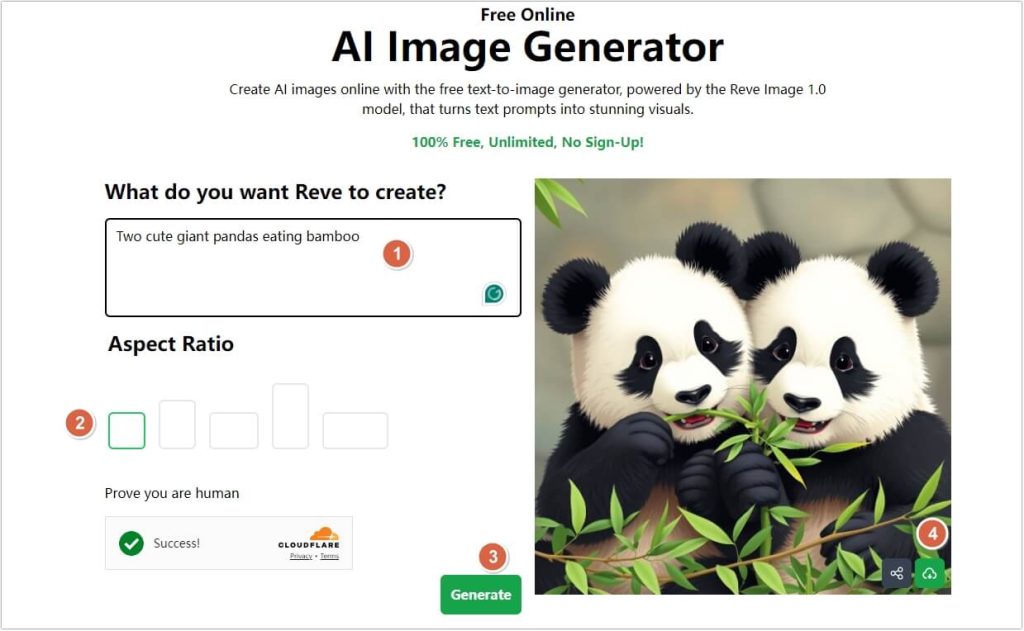
Step 1: Enter Your Text Prompt
The first step is to describe the image you want to create. You can start with a simple phrase or provide more detailed input. The key to getting the best results is to be as specific as possible. For instance, you could type:
- “A peaceful sunset over a mountain lake with a perfect reflection.”
- “A futuristic city with glowing neon lights.”
- “A portrait of a cat in an impressionist style.”
The more detailed and vivid your description, the more accurate and tailored the generated image will be!
Step 2: Choose Your Style and Settings
Once you’ve entered your text prompt, it’s time to select the art style that aligns with your vision. Reve AI offers various styles, such as:
- Photorealistic
- Illustration
- Abstract
- Fantasy
- Modern Art
Additionally, you can further customize the image by adjusting settings like:
- Color Palette: Choose the color scheme that best fits your artistic vision.
- Aspect Ratio: Customize the dimensions of your image, such as landscape or portrait orientation.
- Other Settings: Tweak additional options like mood, lighting, and other stylistic elements to give the image a personal touch.
This level of customization ensures that the final result reflects your artistic preferences.
Step 3: Generate Your Image
Once you’ve finalized your prompt and settings, simply click the Generate button. Reve AI will process your description and create an image based on your specifications. In just moments, you’ll see your vision come to life!
Step 4: Review & Refine
Once the image is ready, take a look at the result. If the image is exactly what you envisioned, you’re good to go! However, if it’s not quite right, don’t worry. You can easily make adjustments by:
- Tweaking your prompt for better accuracy.
- Changing settings such as the style, color palette, or aspect ratio.
- Clicking Generate again to produce a new version with the updated changes.
This process allows you to refine the image until it’s just how you want it.
Step 5: Download and Share
When you’re happy with the final artwork, download it in your preferred format, such as PNG or JPEG. The image is now ready to be used for any project, whether personal, commercial, or for creative inspiration.
Additionally, you can instantly share your artwork on social media platforms to showcase your creation with friends and followers. The possibilities for creativity with Reve AI are endless!
Applications of Reve AI in Art Creation
As highlighted in Wikipedia, AI is making its mark across various creative fields, enabling faster and more innovative ways to produce art and design. The potential applications of Reve AI go beyond personal art projects. This tool is quickly becoming an essential asset in various industries such as advertising, game design, and even film production. Let’s explore how Reve AI is revolutionizing traditional art creation:
Commercial Use
In marketing and advertising, visual content is key to grabbing consumers’ attention. Reve AI can help create eye-catching promotional images in a fraction of the time it would take to commission traditional artwork. This can help businesses save on design costs while still producing high-quality visuals.
Game Design
For game developers, Reve AI Image Generator offers a quick and efficient way to create environments, characters, and assets for games. With its customizable models, developers can generate assets that match the style of their game world in a matter of seconds.
Graphic Design
Graphic designers can leverage Reve AI to produce unique logos, backgrounds, and other visual elements for branding and client projects. The speed and quality of the tool make it an indispensable asset for any design professional.
FAQs About Reve AI Image Generator
Here are some frequently asked questions about Reve AI Image Generator that will help clarify any doubts you may have:
What is Reve AI?
Reve AI is a powerful AI-powered tool designed to generate stunning and high-quality digital art based on textual descriptions. By using cutting-edge machine learning models, Reve AI transforms your prompts into unique artworks across various styles like photorealistic, abstract, fantasy, and more. Whether you’re a professional artist or just someone exploring creative ideas, Reve AI allows you to create art in a matter of minutes.
Is Reve AI Free?
Yes, Reve AI offers a free plan for users to try out the platform. The free version comes with some limitations, such as access to fewer features and a restricted number of image generations. However, if you’re looking to access advanced features like high-quality downloads and premium art styles, you can upgrade to one of the paid plans. You can always start with the free plan and decide later if you want to explore more premium options.
Is Recraft AI Free to Use?
While this question refers to Recraft AI, it’s important to note that Recraft AI and Reve AI are different platforms. However, similar to Reve AI, Recraft AI offers both free and paid subscription options. The free version usually comes with basic features, and the premium plans unlock additional customization and generation capabilities.
Can You Use AI with Reve AI?
Yes, absolutely! Reve AI is powered by AI technology. The AI behind Reve AI is designed to understand your text prompts and translate them into beautiful images in various artistic styles. This technology makes it easy for anyone to generate professional-quality art without requiring any prior knowledge of design or digital art tools.
Conclusion
In summary, Reve AI Image Generator is a powerful tool that is redefining the way we approach digital art. With its advanced features, fast processing time, and customizable settings, Reve 1.0 is a must-have for anyone looking to create stunning artwork quickly and efficiently. Whether you’re an artist, designer, or marketer, Reve AI has the potential to transform your creative process.
As the world of AI art continues to evolve, tools like Reve AI will undoubtedly play a leading role in shaping the future of digital design. By incorporating AI into the creative process, we’re entering an era where imagination has no limits.
Expert Review: “Reve AI has redefined the creative landscape with its fast image generation and high-quality outputs. It’s an exciting tool for both professionals and hobbyists looking to enhance their artwork with AI.” — John Doe, Graphic Designer
For more information, visit Reve AI and learn how this tool is shaping the future of digital art creation.

 English