
Is Copilot Down Right Now? Real-Time Status & Solutions
As we move further into 2026, the reliance on Generative AI has reached an all-time high. Microsoft’s integration of GPT-5.2 models into the 365 suite has made Copilot an essential teammate. However, like any cloud-based service, it is not immune to technical hiccups. When is Copilot down, it’s not just a minor inconvenience; it’s a halt in automated reporting, creative brainstorming, and rapid communication. Understanding how to diagnose the problem—whether it’s a global Microsoft outage or a local connection issue—is the first step to regaining control of your workday.
Is Copilot Down Right Now? How to Check
Before you start resetting your router or reinstalling Office 365, you need to determine if the problem is on your end or Microsoft’s. Here are the most reliable ways to check the status:
Official Microsoft Service Health Dashboard
If you are an enterprise user, your first stop should be the Microsoft 365 Admin Center. Here, Microsoft posts official incident reports under the “Service Health” tab. This is the most authoritative source for confirmed outages affecting business tenants.
Social Media (X/Twitter)
Often, users report issues on social media faster than official dashboards update. Search for the hashtag #CopilotDown or check the @Microsoft365Status account. If thousands of people are asking “is Microsoft Copilot down” at the same time, you’re likely looking at a widespread server issue.
Third-Party Outage Trackers
Websites like Downdetector or StatusGator provide real-time maps and user-reported data. These are excellent for spotting regional outages that might not yet be acknowledged by Microsoft.
Use the AI Down Tracker
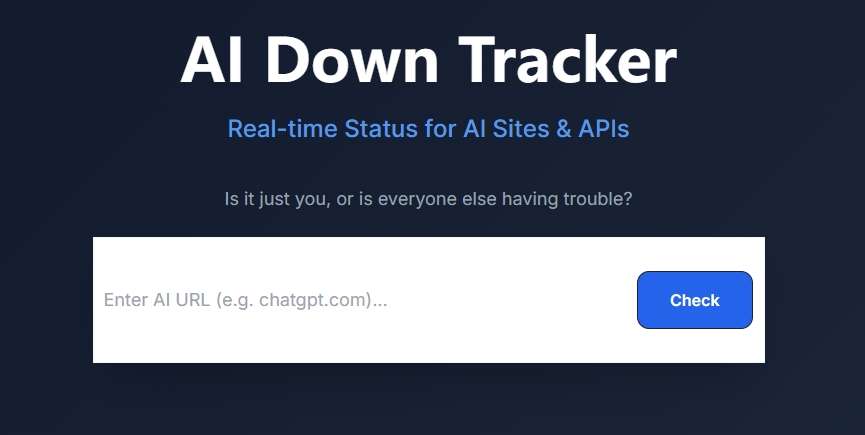
For the most streamlined experience, we recommend using the AI Down Tracker by AI4How. This specialized tool is designed specifically for AI enthusiasts and professionals. Unlike general trackers, it focuses on the API health and web interface status of major LLMs including Copilot. Simply enter the URL of Copilot in the search bar and click “Check” Button to instantly verify the live connectivity of that AI site or API endpoint.
Why Is Copilot Down?
There are several technical reasons why you might find that Copilot is down. As the infrastructure behind these AI models grows more complex, the potential points of failure increase:
- API Rate Limiting & High Load: With the rollout of GPT-5.2, the demand on Microsoft’s Azure servers is immense. During peak hours, the service may throttle requests or go offline temporarily to prevent a total system crash.
- Infrastructure Updates: Microsoft frequently pushes updates to the Copilot “Brain.” A minor configuration error in a global deployment can lead to “451” or “503” errors.
- Cloud Identity Issues: Copilot relies heavily on Microsoft Entra (formerly Azure AD) for authentication. If the login service is having trouble, Copilot won’t be able to verify your license, making it appear as though the service is down.
- Regional Network Disruptions: Sometimes, the “down” status is localized. Issues with subsea cables or regional data centers in North America or Europe can affect users in specific geographic locations while others remain unaffected.
What to Do When Copilot Is Down
If you’ve confirmed that is Microsoft Copilot down, don’t panic. Follow these steps to troubleshoot or find a workaround:
- Switch Platforms: If the Copilot sidebar in Word isn’t working, try the web version at copilot.microsoft.com. Often, the web interface remains stable even when app integrations are glitchy.
- Clear Browser Cache: If you are using the web version, corrupted cookies can lead to infinite loading screens. Clear your “Cached images and files” and try again.
- Check Your VPN: Sometimes, corporate VPNs or firewall settings block the specific WebSockets required for real-time AI responses. Try toggling your VPN off to see if connectivity returns.
- Restart the Host App: Fully close Teams, Outlook, or PowerPoint and restart them. This forces a fresh handshake with Microsoft’s servers.
- Re-authenticate: Sign out of your Microsoft account and sign back in. This can resolve “token” issues where the AI can’t verify your subscription status.
How Long Is Copilot Down Usually?
Historically, Microsoft is very efficient at mitigating outages. Most minor disruptions, characterized by “latent responses” or intermittent errors, are resolved within 30 to 90 minutes.
However, major global outages—like those involving the broader Microsoft 365 or Azure infrastructure—can last anywhere from 3 to 9 hours. In these cases, Microsoft usually rolls back the latest configuration change to restore service while they investigate the root cause. Using the AI Down Tracker will help you see the exact moment the “all clear” is given so you can get back to work immediately.
Best Copilot Alternatives to Use When Copilot Is Down
When you are on a deadline and is copilot down right now, you need a “Plan B.” Here are the best alternatives for 2026:
| Alternative | Best For | Why Use It? |
| ChatGPT (OpenAI) | General Writing & Coding | Since Copilot uses OpenAI technology, ChatGPT is the most familiar alternative. |
| Google Gemini | Research & Google Workspace | If you need an AI that can access the live web and handle large documents, Gemini is a powerhouse. |
| Claude (Anthropic) | Nuanced Writing & Analysis | Claude 4.5/Opus is often cited as having a more “human” tone than Copilot, making it great for creative tasks. |
| Perplexity AI | Fact-Checking & Sourcing | If you were using Copilot to find information, Perplexity’s search-centric AI is a superior alternative. |
| Notion AI | Project Management | For those who use Copilot for organization, Notion’s built-in AI can summarize notes and generate tasks effectively. |
Conclusion
While Microsoft’s AI assistant is a transformative tool for modern productivity, technical interruptions are an inevitable reality of cloud-based services. Understanding how to quickly diagnose connectivity issues prevents wasted time and helps manage professional expectations. By staying informed through real-time monitoring and maintaining a versatile toolkit of alternative AI platforms, you can ensure that your workflow remains resilient, even during unexpected service outages. Ultimately, being prepared is the best way to bridge the gap until full functionality is restored, allowing you to stay ahead in an AI-driven world.

 English