
Is Claude.ai Down? Troubleshooting & Solutions

In the fast-paced world of artificial intelligence, Claude AI has emerged as a powerhouse for developers, writers, and researchers alike. However, nothing halts productivity faster than a sudden “Internal Server Error” or a spinning loading icon. If you find yourself asking, “is Claude AI down?”, you are not alone. Service interruptions can range from minor regional glitches to major global outages.
This comprehensive guide will show you exactly how to verify if claude.ai is down, how to troubleshoot issues on your end, and which alternatives to turn to when the servers are truly unresponsive.
Is Claude.ai Down? How to Check Current Status Right Now
When Claude stops responding, the first step is to determine if the problem is widespread or specific to your device. AI models like Claude 3.5 Sonnet and Opus require massive computational power, and occasionally, the infrastructure simply reaches its limit.
1. Check the Official Anthropic Status Page
Anthropic maintains a dedicated status page that provides real-time updates on their API, web interface, and specific model performance. If there is a “Major Outage” or “Degraded Performance,” it will be listed here first.
2. Use Third-Party Trackers
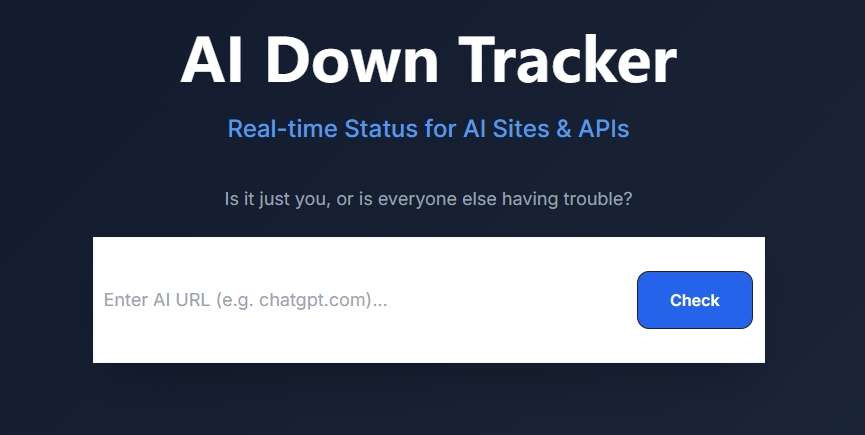
Sometimes official pages take a few minutes to update. For the most immediate “crowdsourced” data, many users rely on the AI Down Tracker by AI4How. It is a dedicated real-time monitoring tool designed to provide instant visibility into the operational status of world-leading AI platforms and APIs. Instead of wondering if a service disruption is “just you” or a global outage, this tool offers a centralized dashboard to check the health of your favorite AI services at a glance.
3. Social Media and Community Hubs
- X (formerly Twitter): Search for the hashtag #ClaudeAIDown or check the @AnthropicAI official handle.
- Reddit: Visit the r/ClaudeAI subreddit. If claude ai is down, the “New” tab will be flooded with reports within seconds.
Troubleshooting: Steps to Fix Claude AI Issues on Your End
If the status pages say “All Systems Operational” but you still can’t get a reply, the issue is likely local. Here is a step-by-step checklist to get Claude back up and running.
Clear Browser Cache and Cookies
Over time, stored data can become corrupted, leading to login loops or interface bugs.
- Go to your browser settings.
- Select “Clear Browsing Data.”
- Choose “Cookies and other site data” and “Cached images and files.”
- Restart your browser and try logging into claude.ai again.
Disable Conflicting Extensions
Some browser extensions, especially VPNs, ad-blockers, or grammar checkers, can interfere with the WebSocket connections Claude uses to stream text. Try opening Claude in Incognito Mode (Chrome) or Private Window (Firefox). If it works there, one of your extensions is the culprit.
Check Your Network and VPN
Claude AI has strict regional availability. If you are using a VPN, ensure you are connected to a supported region (like the US or UK). Conversely, if you aren’t using one, try switching from Wi-Fi to mobile data to rule out an ISP-level block.
Verify Usage Limits
Sometimes claude ai is down only in the sense that you’ve hit your message limit. Free tier users often see the “You have no messages remaining until [Time]” notification, which can be mistaken for a site error if the notification fails to load properly.
What to Do When Claude AI is Officially Down
If the servers are confirmed to be at capacity or undergoing maintenance, there is very little you can do but wait. However, you can manage the downtime professionally:
- Export Your Work: If the interface is partially working but slow, copy your important prompts and Claude’s previous responses into a local document.
- Monitor for Recovery: Keep the AI4How AI Down Tracker open in a tab. It will save you from manually refreshing the Claude page and potentially getting rate-limited.
- Avoid “Spamming” the Send Button: When the server is struggling, repeated clicks only add to the load and can lead to temporary IP bans or 429 “Too Many Requests” errors.
Best Claude AI Alternatives to Use During Downtime
If you have a deadline and claude.ai down is simply not an option, these three alternatives offer similar (or superior) capabilities in specific areas.
1. ChatGPT (OpenAI)
As the primary competitor, ChatGPT (especially the GPT-4o model) is the most reliable backup. While Claude is often praised for its “human-like” writing style, ChatGPT excels at logical reasoning and complex data analysis.
- Best for: General assistance, data visualization, and web browsing.
2. Perplexity AI
If you were using Claude for research or fact-checking, Perplexity is a better temporary home. It functions as an “AI Search Engine,” citing every source it uses to generate an answer.
- Best for: Verifying facts and finding up-to-date news that Claude’s training data might miss.
3. Google Gemini
Gemini (formerly Bard) is integrated deeply into the Google ecosystem. If you need to summarize a Google Doc or find something in your Gmail while Claude is unavailable, Gemini is incredibly fast and rarely experiences the same “high traffic” outages as newer models.
- Best for: Speed and Google Workspace integration.
| Feature | Claude AI | ChatGPT | Perplexity | Gemini |
| Writing Style | Highly Natural | Informative | Concise | Direct |
| Coding | Excellent | Very Good | Good | Average |
| Availability | Medium | High | High | Very High |
Conclusion
Finding that claude ai down is the case can be frustrating, especially when you rely on its nuanced writing and coding abilities. By following the steps outlined above—checking official status pages, troubleshooting your local connection, and having a solid backup plan with ChatGPT or Perplexity—you can ensure that a server glitch doesn’t derail your entire day.
For the most reliable, real-time updates on whether is Claude.ai down, we highly recommend bookmarking the AI4How’s 100% Free AI Down Tracker. It’s the fastest way to stay informed and get back to work as soon as the green light returns.

 English