
Chutes.ai Down? Current Server Status, Fixes & Updates
In the fast-paced world of decentralized AI and serverless GPU compute, reliability is everything. Whether you are an AI developer deploying a new Llama-3 model or a user connecting to a Chutes proxy for a creative project, encountering a “Network Error” or a “503 Service Unavailable” can bring your workflow to a grinding halt. If you are currently asking, “Is chutes.ai down?” or experiencing slow response times, you are in the right place. This guide provides real-time methods to check the chutes ai down status, identifies common error codes, and offers actionable fixes to get your AI models back online.
Quick Check: Is Chutes.ai Down Right Now?
Before performing deep troubleshooting, verify the global status of the platform. Because Chutes.ai operates on a decentralized network (built atop the Bittensor ecosystem), outages can sometimes be localized to specific miners or API gateways.
1.Official Status Page: The first stop should always be the Official Chutes Status Page. This dashboard tracks the uptime of the main website, API endpoints, and historical incidents.
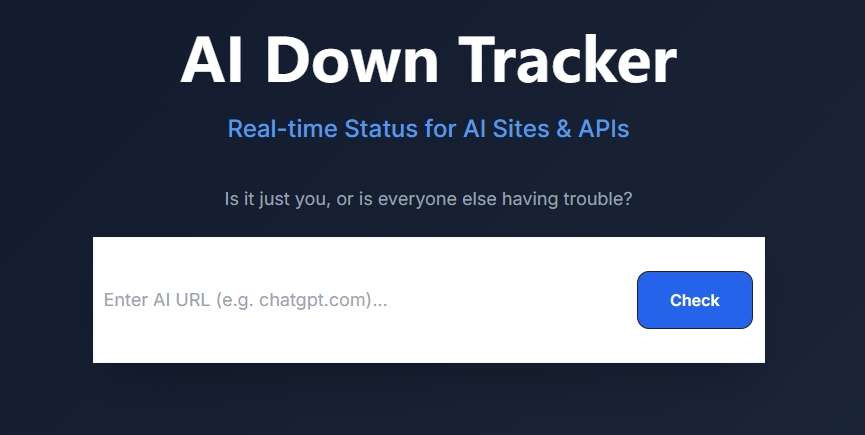
2. The AI Down Tracker by AI4How: For a lightning-fast, third-party verification, we recommend the AI Down Tracker. It provides a “zero-cache” live look at whether the Chutes servers are reachable from the public web.
Why use it to monitor Chutes AI?
- Real-Time API Health: Chutes is more than just a website; it’s an infrastructure. AI4How helps you monitor the uptime of critical API endpoints to ensure your integrated apps keep running.
- Ad-Free & Fast: Experience a clean interface with no registration required. Just enter chutes.ai and get your answer in seconds.
- Privacy-Focused: No data collection or login needed — simply a functional tool to verify if the service is “just you” or a global outage.
How to use it: Navigate to the AI Down Tracker, type chutes.ai in the search bar, and click “Check.” If the result shows a “Down” status, the issue is on the provider side, and you will need to wait for a fix.
3. Community Hubs: Check the r/JanitorAI_Official or r/SillyTavernAI subreddits. Since many users use Chutes as a proxy for these platforms, a “chutes ai down” event usually triggers an immediate megathread in these communities.
Common Reasons for a Chutes.ai Down Event
As a decentralized compute provider, Chutes.ai faces unique challenges compared to centralized providers like OpenAI. Understanding these can help you troubleshoot more effectively.
1. High Traffic & Model Overload
With the release of popular open-source models like DeepSeek-R1 and Llama-3.1, Chutes often experiences massive traffic spikes. If the network of miners cannot scale fast enough to meet demand, you may see chutes ai down errors or extremely high latency.
2. Decentralized Miner Fluctuations
Since Chutes utilizes a decentralized GPU network, individual “chutes” (instances) may go offline if the specific miner hosting that model shuts down or loses its connection. This can result in a “404 Chute Not Found” or “No Instances Available” error even if the main website is up.
3. API URL & Config Changes
In 2024 and early 2026, Chutes updated its API structures to improve security. Many users reporting that “Chutes is down” are actually using outdated API URLs. Ensure you are using the correct endpoint: https://llm.chutes.ai/v1/chat/completions
How to Fix Chutes.ai Connection Issues
If the AI4How AI Down Tracker indicates the site is operational, but you still cannot connect, the problem likely lies in your local configuration or account status.
Step 1: Verify Your API Key
Chutes API keys usually begin with cpk_.
- Fix: Go to your Chutes dashboard, copy a fresh key, and ensure there are no trailing spaces when pasting it into your application. If your key has been compromised or expired, generating a new one often solves the “401 Unauthorized” error.
Step 2: Check for “Proxy Errors”
Many users connect to Chutes via third-party interfaces. If you see a proxy error:
- Open your configuration settings.
- Ensure the status is set to Active.
- Click Save Settings (even if you haven’t changed anything) to re-trigger the handshake.
- Refresh your browser and test the connection again.
Step 3: Handle “402 Payment Required”
Chutes has moved toward a more robust usage model. If you are a free user, you may have exhausted your daily request quota.
- Fix: Check your account balance on the Chutes dashboard. If you are on the “Base” tier, remember there is a 300 request/day limit.
Step 4: Toggle DNS or VPN
Sometimes, localized network routing can cause a perceived chutes.ai down state.
- Fix: Try switching to Google DNS (
8.8.8.8) or Cloudflare DNS (1.1.1.1). Alternatively, if you are using a VPN, try a different region or turn it off to see if your ISP is throttling the decentralized network traffic.
Chutes AI Error Code Guide
If you see a specific number in your error log, use this table to find the solution:
| Error Code | Meaning | Solution |
| 401 | Invalid Token | Your API key is incorrect or expired. Re-generate in the dashboard. |
| 404 | Chute/Model Not Found | The specific model name is misspelled or the miner is offline. |
| 429 | Rate Limit Exceeded | You are sending requests too fast. Slow down or upgrade your plan. |
| 500 | Internal Server Error | Chutes’ backend is struggling. Wait 5-10 minutes. |
| 503 | Service Unavailable | The servers are overloaded or in maintenance mode. Check the status page. |
How to Stay Updated on Chutes.ai Down Status
To minimize the impact of future chutes ai down incidents, follow these proactive steps:
- Monitor the Discord: The Chutes Discord server is the most active place for real-time developer updates. If there is a major migration or a Bittensor network issue, you will hear about it there first.
- Use Multiple Models: If DeepSeek-R1 is overloaded and showing as “down,” try switching to a less popular model like Qwen2.5 or Mistral. These are often hosted on different miners with more available capacity.
- Bookmark the AI Down Tracker: Having the AI Down Tracker by AI4How bookmarked allows you to instantly verify service status without wasting time on local troubleshooting.
Final Thoughts
While Chutes.ai provides a revolutionary way to access high-performance AI compute, its decentralized nature means occasional instability is part of the territory. By using the AI4How’s AI Down Tracker and following the troubleshooting steps outlined above, you can quickly determine if the issue is a global chutes.ai down event or a simple configuration error.

 English