
Is Chub AI Down? Find Out How to Check and Solve It
Chub AI (and its companion site, Venus Chub) has become a cornerstone for the AI community, but like any sophisticated platform, it isn’t immune to technical hiccups. Whether it’s a massive DDoS attack, server maintenance, or a simple browser cache error, understanding the current status and knowing how to fix connection issues is essential for any power user. If you are staring at a blank screen or getting no response, the first question on your mind is likely: is chub ai down?
In this comprehensive guide, we will analyze why chub ai down events happen, how to check the official status, and what you can do to get back to your chats immediately.
Is Chub AI Down? Current Status Check
Before diving into complex troubleshooting, you need to determine if the problem is universal or just on your end. High-traffic AI platforms often face localized outages or API-specific downtime that might not affect every user.
1. The Official Status Page
The most reliable way to confirm an outage is to visit the official Chub status page. This dashboard provides real-time data on:
- Web Frontend: Is the website itself loading?
- API Services: Are the backend connections for bot responses active?
- Internal Models: Status of specific models like Soji, Mixtral, or Ash.
2. Community Hubs (Reddit & Discord)
If the status page hasn’t updated yet, the community usually knows first. Check the r/Chub_AI subreddit or the official Discord server. When chub ai down reports start flooding these platforms, you can be certain the developers are already working on a fix.
3. Use a Third-Party Tracker
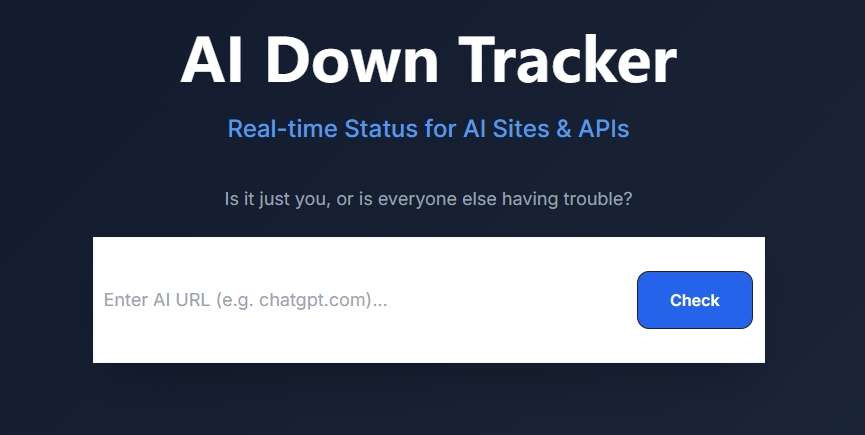
For an objective, outside-in perspective, we recommend using a dedicated monitoring tool. When you need a fast “Yes/No” answer, the AI Down Tracker by AI4How is an excellent resource. It tracks various AI services specifically, offering a more tailored view than general “down for everyone” websites.
Key Features:
- AI Web Status: Check if AI Sites (like ChatGPT or Claude.ai) are accessible to users.
- API Health Check: Monitor the uptime of critical API endpoints to ensure your integrated apps keep running.
- 100% Free & Ad-Free: Enjoy a premium tracking experience without subscriptions, hidden fees, or annoying ads.
- No Registration Needed: No signup, no login, and no data collection — privacy-focused tool for instant use.
- Lightning Fast & Live: Automated status updates in seconds with zero-cache technology for total accuracy.
- User-Friendly & Intuitive: A clean, modern interface designed for everyone. No technical setup or learning curve — just open and check.
How to Use:
Simply enter any URL in the search bar and click “Check” Button to instantly verify the live connectivity of that AI site or API endpoint.
Common Reasons for Chub AI Outages
Understanding the “why” behind an outage can help you estimate how long it might last. Based on historical data from late 2024 and 2026, several recurring factors contribute to chub ai down scenarios.
Server Maintenance and Updates
Chub AI frequently updates its “index” scripts and engine versions (such as the Aphrodite engine). During these transitions, the site may go into maintenance mode. Recently, the developers moved from rental machines to locally owned hardware to improve long-term stability—a move that caused temporary but necessary downtime.
DDoS Attacks
As a high-profile site in the AI roleplay niche, Chub AI has unfortunately been the target of Distributed Denial of Service (DDoS) attacks. These attacks overwhelm the servers with traffic, making the site inaccessible. While Chub has implemented Cloudflare protection, massive attacks can still cause intermittent lag or total blackouts.
API Connection Errors
Sometimes the site is up, but your bots aren’t talking. This usually indicates an issue with the API provider (like OpenAI, OpenRouter, or NovelAI) rather than Chub itself. If you see a “504 Gateway Timeout” or “API Connection Error,” the bottleneck is likely at the model provider level.
How to Fix “Chub AI Not Working” (Step-by-Step)
If you’ve checked and it seems that is chub ai down for only a few people (or just you), try these proven fixes to restore your session.
1. Hard Refresh and Cache Clear
Chub AI uses a large JavaScript file to run its interface. If the site updates while you have an old version cached, your browser might “whine” about MIME types or show a blank screen.
- On PC: Press Ctrl + F5 (or Cmd + Shift + R on Mac).
- On Mobile: Clear your browser’s site data specifically for chub.ai.
2. Check Your VPN Settings
Many users report that certain VPN servers are blocked or cause “looping” login screens. Try toggling your VPN off or switching to a different region (e.g., switching from a US server to a European one) to see if the connection clears up.
3. Adjust Context Size
If the site loads but bots aren’t responding, your “Context Size” might be too high for the current server load. Try lowering your context tokens to under 30k. During peak hours, the server may struggle to process massive memory histories, leading to a perceived chub ai down state.
4. Direct Script Link
In cases where the main page fails to load due to a caching error, some users have found success by clicking the direct link to the latest assets script (often shared by mods on Reddit) or simply using the mobile app instead of the web browser.
Conclusion
While encountering a chub ai down message is never ideal, it is usually a temporary hurdle. By utilizing the official status page, community reports, and the AI4How’s AI Down Tracker, you can stay informed and minimize your downtime.
Remember, most issues are solved by a simple hard refresh or by waiting for the developers to mitigate a traffic surge. The platform continues to evolve, and its move toward private hardware signals a more stable future for AI roleplay enthusiasts.

 English