
Best AI Spreadsheet Tools for Combining Spreadsheets Free
In today’s data-driven workplace, professionals face a universal challenge: efficiently combining information from multiple spreadsheets. Manual methods like copying, pasting, and complex formulas are not only time-consuming but also highly prone to errors, creating a significant bottleneck to productivity. This is where Artificial Intelligence offers a revolutionary solution. AI-powered tools automate the tedious task of data consolidation, intelligently mapping fields and merging spreadsheets with precision. For anyone seeking the best ai spreadsheet tool for combining spreadsheets free, this guide reviews the top seven platforms for 2026. These solutions can transform hours of manual work into a seamless, automated process, ensuring your data is unified, accurate, and ready for analysis.
Why You Need an AI Spreadsheet Tool for Combining Spreadsheets
Eliminate Human Error
Manual data handling is inherently prone to mistakes. A single misaligned row or incorrect cell reference can compromise your entire dataset, leading to flawed analysis and poor business decisions. AI tools automate the consolidation process, ensuring consistent, error-free results every time.
Save Valuable Time
What typically takes hours or even days of tedious work can be accomplished in minutes with AI automation. These tools process and combine datasets at computational speeds, freeing up your time for more strategic tasks like data analysis and decision-making.
Handle Complex Data Relationships
Modern data consolidation often involves multiple sources with different structures, formats, and naming conventions. AI-powered tools can intelligently map fields, recognize patterns, and standardize data across various formats, handling complexities that would be overwhelming to manage manually.
Enable Real-Time Data Updates
In a dynamic business environment, data changes constantly. AI tools can be scheduled to automatically update your combined datasets at regular intervals, ensuring you’re always working with the most current information without manual intervention.
Improve Data Quality
Beyond simple merging, AI tools can clean, standardize, and enrich your data during the consolidation process. They can identify duplicates, fill in missing information, and apply consistent formatting rules—transformations that are crucial for reliable analysis.
Scale with Your Needs
As your business grows, so does your data volume and complexity. AI-powered solutions are designed to handle increasing workloads seamlessly, whether you’re combining dozens of spreadsheets or processing millions of data points.
Provide Intelligent Insights
Many AI spreadsheet tools go beyond basic consolidation to offer predictive analytics, pattern recognition, and smart suggestions. They can identify trends, anomalies, and relationships in your data that might otherwise go unnoticed.
7 Best AI Spreadsheet Tools for Combining Spreadsheets Free
Here is our expertly curated list of the top seven platforms that can help you find the best ai spreadsheet tool for combining spreadsheets free for your unique requirements.
1. Sheetgo
Platform: Web-based, integrates with Google Sheets and Microsoft Excel.
Sheetgo is a dedicated tool built specifically for managing and automating spreadsheet workflows. Its core strength lies in visually creating connections between different spreadsheets to build automated data pipelines.
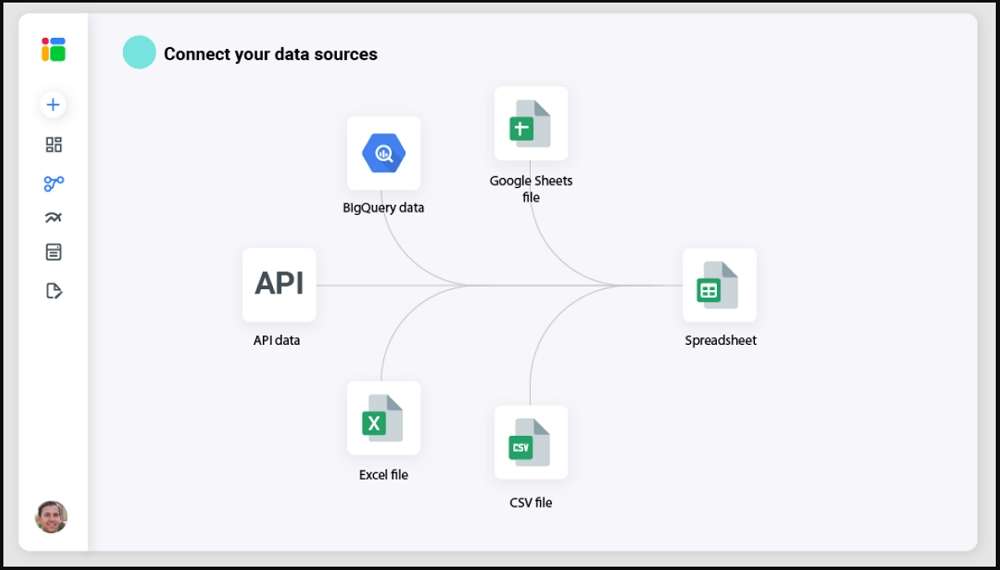
Key Features:
- An intuitive visual canvas to connect source and destination spreadsheets.
- Automated scheduled updates to keep your consolidated data current.
- Built-in data filtering and formatting options during the transfer process.
- Direct integration with both Google Workspace and Microsoft 365 ecosystems.
Pros and Cons:
- Pros: Extremely user-friendly for its specific use case; no coding required; excellent for recurring reporting from multiple team members.
- Cons: Advanced features are locked behind paid plans; less suited for complex, non-spreadsheet data transformations.
Why We Recommend It: Sheetgo is arguably the most straightforward tool on this list for its singular purpose. If your primary need is to consistently merge data from multiple Google Sheets or Excel files without complex logic, its free plan is a perfect starting point.
Expert Comment: “Sheetgo demystifies data automation for everyday spreadsheet users. It turns a complex process of manual consolidation into a simple, visual, and set-and-forget system.”
2. Zoho Sheet
Platform: Web-based, part of the Zoho Office Suite.
Zoho Sheet is a powerful, free-to-use spreadsheet application that goes head-to-head with Google Sheets. Its built-in AI assistant, Zia, provides intelligent insights and automation directly within the familiar spreadsheet environment.
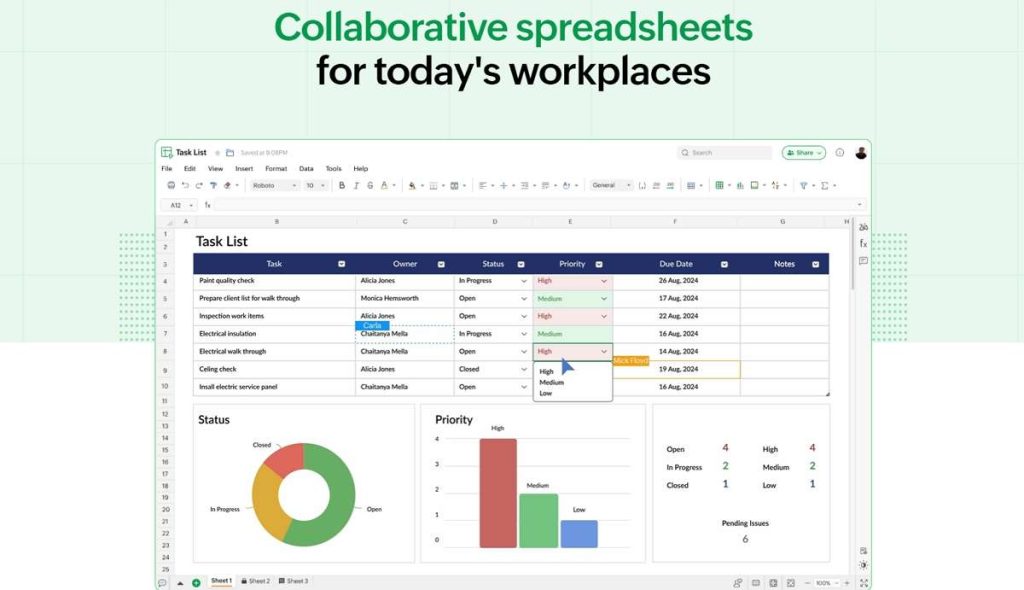
Key Features:
- Native AI “Zia” for data preparation, pattern spotting, and generating charts.
- “Combine Sheets” feature to merge data from multiple Zoho Sheet files easily.
- Strong collaboration features and extensive formula support.
- Completely free for individual users with generous storage.
Pros and Cons:
- Pros: No cost barrier; all features, including Zia, are available in the free version; excellent collaboration tools.
- Cons: The “Combine Sheets” feature works best within the Zoho ecosystem; importing from other sources may require an extra step.
Why We Recommend It: For users looking for a free, all-in-one alternative to Google Sheets that has intelligent data consolidation features baked directly into the platform, Zoho Sheet is a top contender.
User Comment: “Zoho Sheet’s ‘Combine Sheets’ feature, powered by Zia, saved our small team from a weekly data-compilation headache. It’s surprisingly powerful for a completely free tool.“
3. Microsoft Copilot for Excel
Platform: Integrated into Microsoft Excel (Microsoft 365).
Microsoft Copilot is a generative AI assistant deeply integrated into the Excel application. It represents the future of hands-free data manipulation, allowing users to perform complex tasks, including data combination, using natural language commands.

Key Features:
- Use plain English to instruct Copilot to “combine these two tables” or “append data from this sheet.”
- AI-powered data analysis, formula generation, and chart creation.
- Directly works with data in your existing Excel workbooks.
- Seamlessly integrated with the powerful data tools already in Excel (Power Query).
Pros and Cons:
- Pros: Unmatched integration with Excel; understands complex contextual requests; massively reduces the learning curve for advanced Excel features.
- Cons: Requires a Microsoft 365 Copilot subscription, which has a cost; it’s an AI assistant within a tool, not a standalone connector.
Why We Recommend It: For enterprise users and power Excel users who already have a Microsoft 365 Copilot license, this is the ultimate best ai spreadsheet tool for combining spreadsheets free of manual effort, unlocking unprecedented productivity within a familiar environment.
Expert Comment: “Copilot doesn’t just automate tasks; it teaches you Excel. Asking it to combine data and seeing the formulas and steps it uses is a masterclass in advanced spreadsheet management.”
4. Numerous.ai
Platform: Works as an add-on for Google Sheets and Microsoft Excel.
Numerous.ai brings the power of OpenAI’s GPT models directly into your spreadsheet cells. It’s designed for text generation, classification, and extraction, which can be incredibly useful for cleaning and standardizing data before or after combining it.
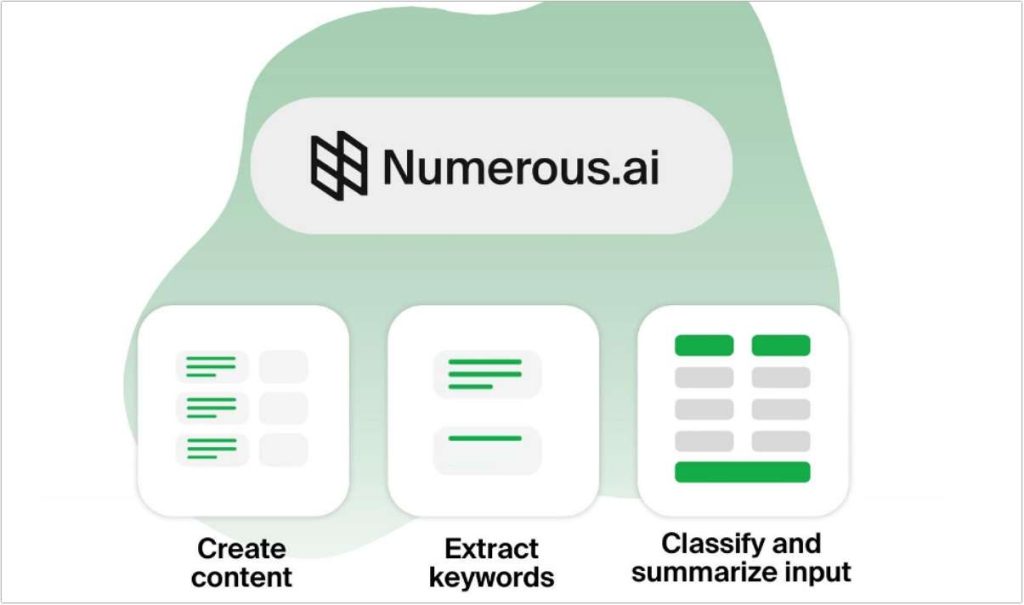
Key Features:
- Use simple formulas like
=AI(...)to generate and manipulate text. - Perfect for categorizing data, extracting keywords, or standardizing names from multiple inconsistent sources.
- Lightweight and easy to install as a sidebar in your spreadsheet.
Pros and Cons:
- Pros: Extremely powerful for text-based data cleaning; very intuitive for users familiar with spreadsheet formulas.
- Cons: It is not a data connector itself; you’ll need to get your data into the sheet first. The free tier has limited AI credits.
Why We Recommend It: If the challenge in combining your spreadsheets is less about the merge and more about the inconsistent, unstructured text data within them, Numerous.ai is the perfect co-pilot to prepare your data for a seamless consolidation.
User Comment: “We merged customer feedback from 10 different sheets, and the data was a mess. Numerous.ai helped me categorize and clean thousands of entries in minutes, something that would have taken days manually.“
5. Zapier
Platform: Web-based automation platform.
Zapier is a leader in no-code automation, connecting over 5,000 web apps. Its “Zaps” can automatically transfer and consolidate data between spreadsheets and countless other services whenever a trigger event occurs.
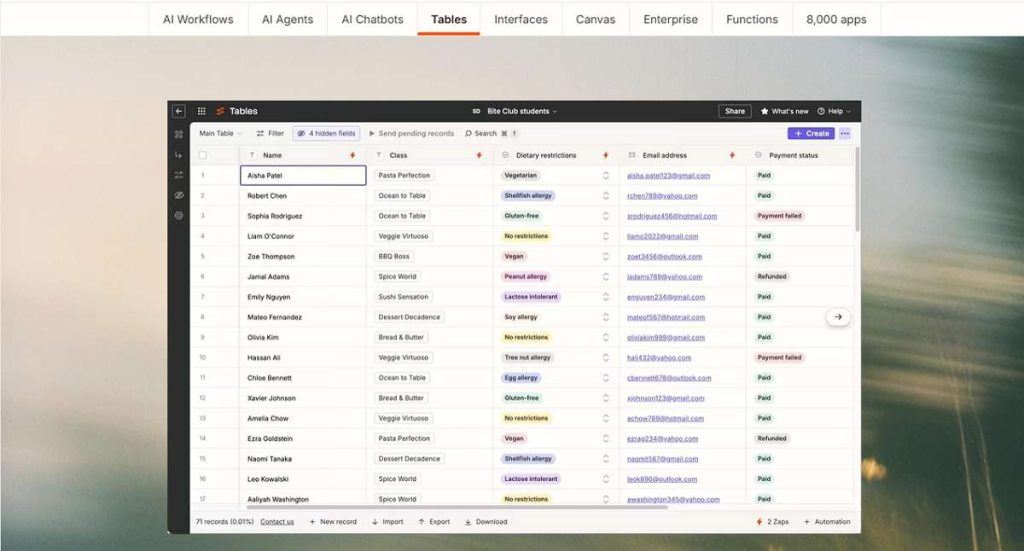
Key Features:
- Create “Zaps” that automatically find new rows in one spreadsheet and append them to a master sheet in another.
- Unprecedented connectivity between apps like Gmail, Slack, Forms, and your spreadsheets.
- A user-friendly interface with built-in filters and formatting steps.
Pros and Cons:
- Pros: Vast app ecosystem; extremely reliable and robust; perfect for cross-platform data consolidation.
- Cons: The free plan is limited to 100 tasks per month; multi-step Zaps require a paid plan.
Why We Recommend It: For automating data flows across your entire tech stack, not just between spreadsheets, Zapier is the industry standard. Its free tier is excellent for testing and for low-volume, critical automation.
Expert Comment: “Zapier is the glue of the modern SaaS ecosystem. It turns your master spreadsheet into a live dashboard that automatically updates from every corner of your digital workspace.“
6. Make (formerly Integromat)
Platform: Web-based visual automation platform.
Make is a powerful alternative to Zapier, known for its sophisticated visual scenario builder. It offers greater control over data flow and transformations, making it ideal for complex data consolidation tasks.

Key Features:
- A dynamic, visual canvas where you can build complex data processing routes.
- In-built data transformation tools (functions, routers, iterators) between steps.
- High granular control over how data is mapped and manipulated from source to destination.
Pros and Cons:
- Pros: More flexible and powerful for complex scenarios than many competitors; free plan includes 1,000 operations per month.
- Cons: The visual interface has a steeper learning curve than Zapier’s linear setup.
Why We Recommend It: If your data combination needs involve complex filtering, routing, or real-time transformation, Make’s free plan provides the power and operational volume to handle it without code.
User Comment: “Make’s visual flow made it easy to see exactly how our data was being merged and transformed. We could set up filters to only combine specific records, which was a game-changer.“
7. Fivetran
Platform: Enterprise-grade cloud-based data integration platform.
Fivetran is designed for businesses that need to centralize all their data into a warehouse like BigQuery, Snowflake, or Redshift. It automates the process of extracting, transforming, and loading (ETL) data from hundreds of sources.
Key Features:
- Fully managed, pre-built connectors that handle API changes automatically.
- Automates the sync of data from sources like databases, ad platforms, and yes, spreadsheets (via Google Sheets connector), into a single warehouse.
- Focuses on reliability, security, and handling massive data volumes.
Pros and Cons:
- Pros: “Set and forget” reliability; handles the most complex data pipelines; excellent for BI and analytics.
- Cons: The free plan (14-day trial) is very limited; it is an enterprise tool with pricing to match; overkill for simple spreadsheet merging.
Why We Recommend It: While its free offering is minimal, Fivetran is included here for organizations whose “spreadsheet combining” has evolved into a need for a full-scale data pipeline. It represents the professional, scalable end of the spectrum.
Expert Comment: “Fivetran is not a tool; it’s a data infrastructure. For companies serious about analytics, it eliminates the constant maintenance of custom data connectors, ensuring your combined data is always accurate and available.“
Comparison of Best AI Spreadsheet Tools for Combining Spreadsheets Free
| Tool | Primary Platform | Best For | Free Plan Limitations | AI/Automation Focus |
|---|---|---|---|---|
| Sheetgo | Web (Sheets, Excel) | Recurring merges of spreadsheets | Limited to 3 active connections & 5 transfers/month | Automated spreadsheet workflows |
| Zoho Sheet | Web (Zoho Suite) | An all-in-one, free Sheets alternative with merge features | None for core features | Built-in AI for data prep & analysis (Zia) |
| MS Copilot | Desktop (Excel) | Excel power users within the M365 ecosystem | Requires a paid M365 Copilot license | Generative AI for commands & analysis |
| Numerous.ai | Add-on (Sheets, Excel) | Cleaning & standardizing text data before/after merging | Limited AI credits | GPT-powered in-cell formulas |
| Zapier | Web-based | Automating data across thousands of apps | 100 tasks/month, 5 Zaps | No-code workflow automation |
| Make | Web-based | Complex, multi-step data transformation & merging | 1,000 operations/month | Visual, granular workflow automation |
| Fivetran | Cloud-based | Enterprise-scale data centralization to warehouses | 14-day free trial | Automated, managed ETL pipelines |
FAQs About Best AI Spreadsheet Tools for Combining Spreadsheets Free
Q1: Is it safe to use free AI tools with my sensitive spreadsheet data?
Absolutely, but due diligence is key. Reputable tools like Zoho Sheet, Sheetgo, and Zapier use industry-standard encryption (like SSL/TLS) and have clear privacy policies. For highly sensitive corporate data, always check the vendor’s security documentation and consider using anonymized test data first.
Q2: Can these tools handle combining very large Excel files?
This varies. Web-based tools like Zoho Sheet and Sheetgo have file size limits. For very large datasets (millions of rows), a local tool like Microsoft Copilot in Excel or a powerful ETL platform like Fivetran is more appropriate, as they are designed to handle significant computational loads.
Q3: I only need to do a one-time merge. Which tool is best?
For a simple, one-off combination of CSV or Excel files, using the built-in “Combine Sheets” in Zoho Sheet or even the “Power Query” tool already inside Microsoft Excel (without Copilot) is your fastest and most straightforward option.
Q4: What does “AI” actually do in these spreadsheet tools?
AI functionality ranges from generative AI (like Copilot and Numerous.ai) that understands your intent, to machine learning that automates data mapping and pattern recognition (as seen in advanced connectors from Fivetran and Make). It essentially reduces the manual steps and guesswork involved in data preparation.
Final Verdict
The quest for the best ai spreadsheet tool for combining spreadsheets free does not have a single answer, because the “best” tool is the one that aligns perfectly with your specific workflow, technical skill level, and data complexity.
- For the casual user merging a few sheets, Zoho Sheet’s native feature is unbeatable for its price (free).
- For the project manager automating weekly reports from their team, Sheetgo provides the most targeted simplicity.
- For the data-savvy marketer cleaning and unifying data from multiple apps, Zapier or Make offer unparalleled automation.
- For the Excel power user, Microsoft Copilot is a transformative leap forward in productivity.
The common thread is that AI and automation are no longer luxuries but essential components for efficient data management. By leveraging one of these tools, you can reclaim valuable time, minimize errors, and ensure your decisions are based on a complete and unified dataset. If your primary task involves merging and performing calculations on numerical data sets, our specialized list of the Best AI Spreadsheet Tools for Combining Numbers can provide you with more targeted options.
What has been your experience with automating spreadsheet tasks? Are you currently using any of these tools, or is there another one we should know about? Share your thoughts and questions in the comments below!

 English