
Is AI Dungeon Down? How to Check and Fix Server Issues
Is AI Dungeon down? If you’re struggling to access the game or experiencing slow loading times, you’re not alone. This article will help you determine whether AI Dungeon is facing downtime and how to check its server status. And we will walk you through how to use an AI Dungeon down detector, identify if the problem is on your end, and explore proven fixes to get your adventure back on track.
Quick Answer: Is AI Dungeon Down Right Now?
Before diving into deep troubleshooting, the fastest way to check the current status of the game is through official and community-monitored channels.
- Official Status Page: The AI Dungeon Status Page provides real-time updates on production servers, beta environments, and specific AI models like Mixtral or GPT-4o.
- The Community “Down Detector”: Since official pages sometimes lag behind real-time outages, checking the r/AIDungeon Reddit or the Official Discord is the best way to see if other players are reporting similar issues.
How to Use an AI Dungeon Down Detector Effectively
When a service goes dark, most users head to third-party “down detector” websites. While these are helpful, AI Dungeon is a niche service compared to giants like Facebook. Here is how to get the most accurate information using modern tools.
The Free AI Down Tracker by AI4How
For the most reliable third-party diagnostic, we recommend the AI4How’s AI Down Tracker. This is a dedicated real-time monitoring tool designed to provide instant visibility into the operational status of world-leading AI platforms.
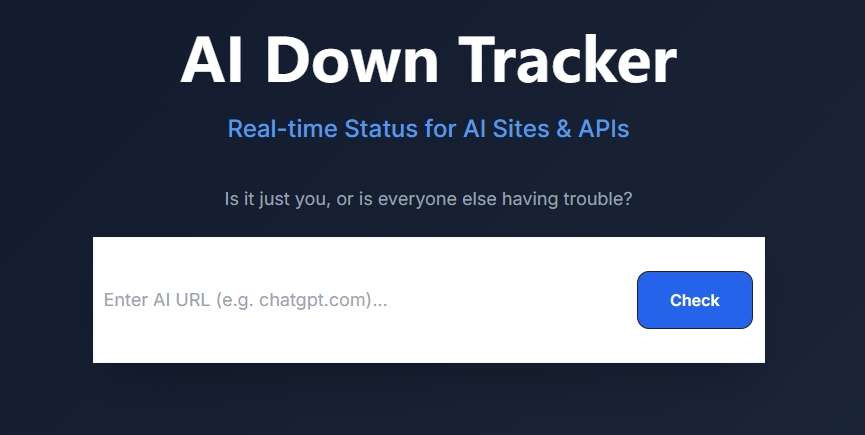
Instead of wondering if a service disruption is “just you” or a global outage, this tracker offers a centralized dashboard to check the health of your favorite AI services at a glance. Its key features include:
- AI Web Status: Instantly check if AI sites like AI Dungeon, ChatGPT, or Claude are accessible.
- API Health Check: It monitors the uptime of critical API endpoints, ensuring that the background processes of the game are functioning correctly.
- 100% Free & Ad-Free: Unlike other trackers that clutter the screen with ads, AI4How offers a premium, clean experience without hidden fees.
- No Registration Needed: You can verify status instantly without signups or data collection, maintaining your privacy.
- Zero-Cache Technology: This ensures that the “Up” or “Down” status you see is the current live state, not a cached version from ten minutes ago.
How to use it: Simply enter the AI Dungeon URL in the search bar and click the “Check” button to instantly verify live connectivity.
Social Media & Community Reports
For a more “human” AI Dungeon down detector, social media is your best friend:
- X (Twitter): Search for the hashtag
#AIDungeonor check the @AiDungeon account for official announcements. - Discord: The “Bugs & Feature Requests” channel in the AI Dungeon Discord is usually the first place developers acknowledge an outage.
Why Is AI Dungeon Down
Understanding why the service is unavailable can help you manage expectations. In late 2024 and 2026, Latitude (the developers) has highlighted several common causes for downtime:
Database Overload
AI Dungeon is a heavy consumer of data. When thousands of players generate complex stories simultaneously, the database provider can reach its throughput limit. During peak hours, this can lead to slow responses or a complete “ai dungeon down” state.
Server Maintenance & Infrastructure Upgrades
To improve stability, the team frequently migrates servers. While they aim for “zero-downtime” deployments, these updates can occasionally cause intermittent connectivity issues for users on older versions of the app.
Model-Specific Outages
Sometimes the game itself is “up,” but the specific AI model you are using (e.g., Llama 3 or Claude) is experiencing issues. If one model is unresponsive, try switching to a different one in your adventure settings to see if it resolves the problem.
How to Fix AI Dungeon Down Issues on Your End
If an AI Dungeon down detector like AI4How shows the site is “Up” but you are still stuck, the issue might be local. Follow these steps:
Step 1: Force Update the App
One of the most frequent reasons for a perceived outage is an outdated client. If the developers push a major API change, older versions of the app will fail to communicate with the server.
- Mobile: Check the Google Play Store or Apple App Store for updates.
- Steam: Restart your Steam client to trigger any pending downloads.
Step 2: Clear Cache and Cookies
If you are playing in a web browser, cached data can sometimes interfere with new site updates.
- Open your browser settings.
- Clear “Cookies and other site data” specifically for
aidungeon.com. - Refresh the page and log back in.
Step 3: Switch Between Wi-Fi and Cellular Data
Occasionally, specific Internet Service Providers (ISPs) or DNS settings can block the connection.
- Test: Turn off your Wi-Fi and try using your phone’s data. If it works, you may need to restart your router or change your DNS settings (e.g., using Google DNS at
8.8.8.8).
Step 4: Toggle Between Beta and Stable
AI Dungeon offers both “Beta” and “Stable” versions. If the Beta servers are undergoing maintenance, you can often continue your story by switching to the Stable production environment in your user settings.
Understanding AI Dungeon Error Messages
If AI Dungeon is down, you will likely see one of these common error codes. Here is what they actually mean:
| Error Message | Likely Cause | Recommended Action |
| Failed to Fetch | Network interruption or server timeout. | Check your internet; retry the action. |
| We’re having trouble connecting to the AI | Server-side AI model failure. | Wait 5 minutes or switch AI models. |
| 401 Unauthorized | Your login session has expired. | Log out and log back in. |
| 503 Service Unavailable | The servers are at maximum capacity. | Check the AI Dungeon down detector; wait for peak traffic to subside. |
Final Thoughts
While it is frustrating when AI Dungeon is down, most outages are resolved within minutes. By using a specialized AI Dungeon down detector like the one provided by AI4How, you can quickly distinguish between a global server issue and a simple local glitch.
Remember, the “infinite possibilities” of AI sometimes come with technical complexities. Usually, a simple app update, a model switch, or a short five-minute wait is all it takes to get back to your digital world.
Are you still experiencing issues? Check the AI Down Tracker now for a live status update.

 English