
Top 7 NotebookLM Alternatives for Smart Note-Taking
As AI-driven note-taking transforms how we capture and interact with information, Google’s NotebookLM has carved out a significant niche. However, it’s not the perfect fit for everyone. Whether due to feature preferences, workflow complexity, or privacy needs, users often seek powerful notebooklm alternatives. This guide provides an expert, in-depth analysis of the top seven alternatives to notebooklm in 2026, evaluating them across functionality, usability, and innovation. We’ll help you find the ideal notebooklm alternative that aligns with your specific approach to knowledge management.
What can NotebookLM do?
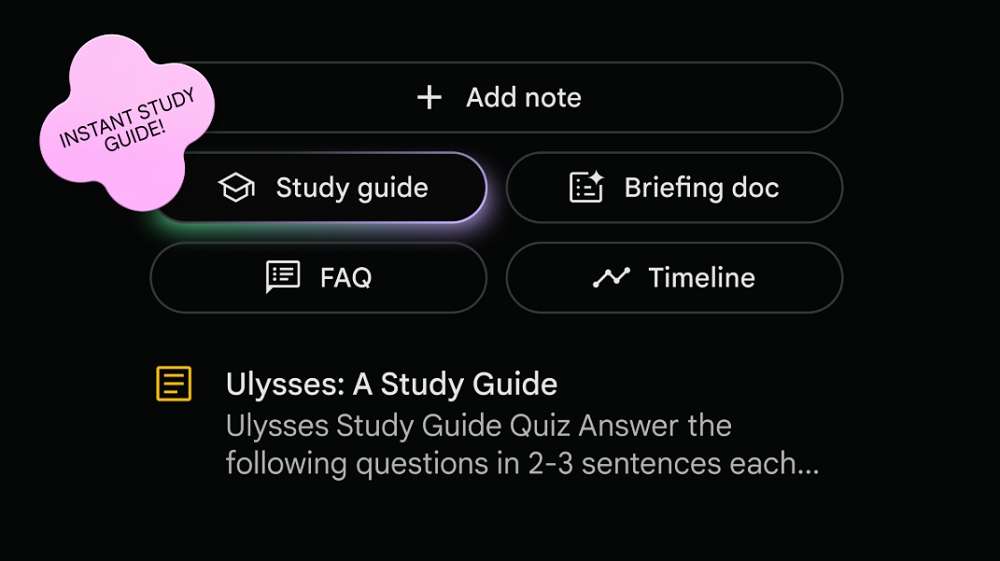
Before exploring notebooklm competitors, it’s essential to understand NotebookLM‘s core value proposition. Developed by Google, NotebookLM (formerly Project Tailwind) is an AI notebook that grounds its responses in your personal sources—notes, documents, and PDFs. Its primary strength is creating a custom AI from your provided materials, allowing for Q&A, summarization, and idea synthesis based solely on your content. This prevents AI hallucinations and keeps the assistant context-specific. However, its capabilities are tightly focused on interacting with uploaded documents, which can limit broader knowledge management and creative workflow applications, leading many to seek a more versatile alternative to google notebooklm. For a deep dive into its fundamental comparison, read our comprehensive analysis: NotebookLM vs ChatGPT: A Comprehensive Comparison for Smarter Note-Taking.
Why You Need NotebookLM Alternatives
While effective within its scope, NotebookLM has limitations. It functions primarily as a conversational layer over static documents rather than a dynamic, integrated workspace. Users might need more robust organization (like databases or graphs), real-time collaboration, multi-format storage, or advanced privacy controls. Furthermore, its integration with other productivity ecosystems can be limited. Exploring alternatives to notebooklm is crucial for users who require deeper note-linking, automated organization, complex project management, or who prefer not to be tied to a specific vendor’s ecosystem. The right alternatives to google notebooklm can transform note-taking from a reactive to a proactive component of your workflow.
Top 7 NotebookLM Alternatives
| Tool | Cross-Platform | UI/UX | Privacy | G2 Rating |
|---|---|---|---|---|
| Notion AI | Web, Win, macOS, iOS, Android | Modern, modular, customizable | Standard (Cloud-based) | 4.6/5 |
| Obsidian + AI | Win, macOS, Linux, iOS, Android | Minimalist, markdown-focused | Very High (Local-first) | 4.0/5 |
| Mem AI | Web, iOS, macOS (beta) | Chat-like, minimal, fast-capture | Standard (Cloud-based) | N/A |
| Tana | Web-only (Early Access) | Unique, outline & tag-based | Standard (Cloud-based) | 4.0/5 |
| Roam Research | Web-centric (Desktop apps) | Unique, graph & daily notes | Standard (Cloud-based) | N/A |
| Evernote AI | Web, Win, macOS, iOS, Android | Classic, feature-rich sidebar | Standard (Cloud-based) | 4.4/5 |
| Saner.AI | Web-only | Lightweight, minimal, action-focused | Standard (Cloud-based) | N/A |
1. Notion AI — Best All-Around Alternative
Supported Systems: Web, Windows, macOS, iOS, Android.
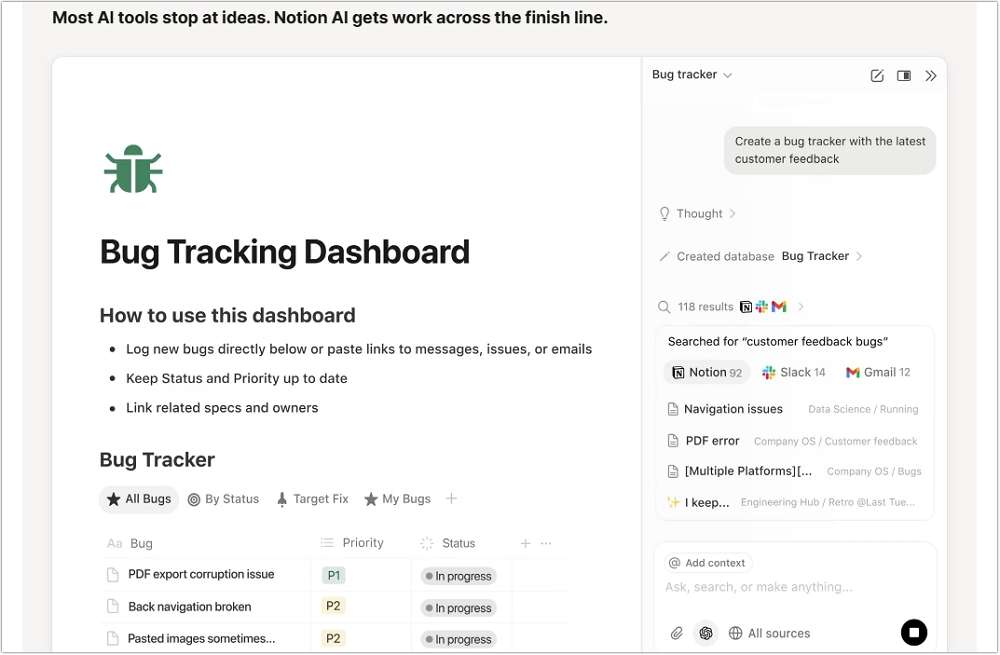
Notion AI is the integrated intelligence layer within the immensely popular Notion workspace. It transforms Notion from a powerful all-in-one wiki and project hub into a generative AI platform, making it a premier notebooklm alternative for users seeking a unified system.
Key Features:
- In-Context AI Actions: Summarize pages, change tones, translate text, and generate content directly within any Notion block.
- AI Autofill for Databases: Automatically populate properties (like status or tags) and create entries based on prompts.
- Q&A with Workspace Knowledge: Ask questions about the content across your entire Notion workspace to surface specific information.
- Seamless Integration: AI features are natively built into the existing editor, requiring no context switching.
Pros:
✔ Unmatched versatility combining notes, docs, databases, and projects.
✔ Excellent for team collaboration and shared knowledge bases.
✔ Reduces busywork by automating formatting and organization.
Cons:
✘ Can feel overwhelming for simple, quick note-taking.
✘ The full power requires understanding Notion’s block-based structure.
Expert Comment: “Notion AI is less about replacing NotebookLM and more about absorbing its function into a broader operating system for work. It’s the best choice if you want AI to enhance an existing, structured ecosystem rather than act as a standalone research assistant.“
2. Obsidian + AI Plugins — Best for Knowledge Management & Privacy
Supported Systems: Windows, macOS, Linux, iOS, Android.
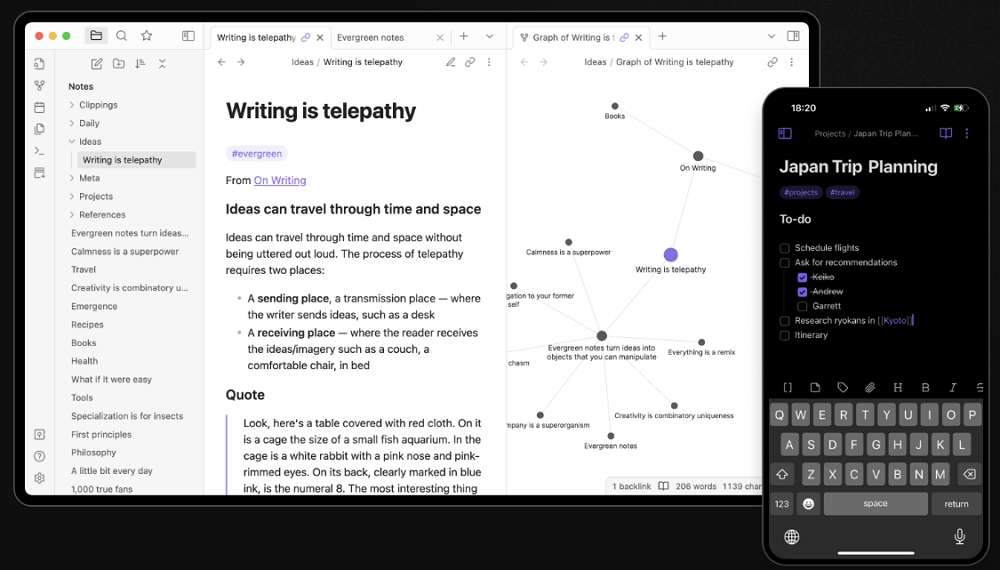
Obsidian is a local-first, markdown-based knowledge base that connects your notes in a powerful network graph. By adding community AI plugins (like “Smart Connections” or “Copilot”), it becomes a fiercely private and customizable notebooklm alternative.
Key Features:
- Local-First & Private: Your notes are stored as plain text files on your device; AI processing can be configured to use local models or your own API keys.
- Powerful Graph View: Visualize and explore connections between ideas organically.
- Modular AI Integration: Plugins allow for AI-assisted writing, linking, summarization, and querying of your vault without sending data to third parties by default.
- Future-Proof Format: Using standard markdown files ensures your notes are never locked into the app.
Pros:
✔ Ultimate control over data privacy and storage location.
✔ Highly extensible via plugins and themes to create a perfectly tailored system.
✔ Creates a true “second brain” through bi-directional linking.
Cons:
✘ Requires technical comfort for initial setup and plugin configuration.
✘ Lacks native, seamless real-time collaboration features.
User Comment: “As a researcher dealing with sensitive data, Obsidian with AI plugins gives me the analytical power of tools like NotebookLM without ever compromising my data sovereignty. It’s my permanent, owned knowledge graph.”
3. Mem AI — Best for Automated Knowledge Organization
Supported Systems: Web, iOS, macOS (beta).
Mem AI calls itself the “world’s first AI-powered workspace that’s organized by default.” It focuses on capturing thoughts and information effortlessly and uses AI to automatically connect, tag, and surface relevant mems, positioning itself as a top alternative to google notebooklm for the organization-averse.

Key Features:
- Automatic Tagging & Linking: AI identifies topics and relationships between notes, creating a self-organizing network.
- Universal Capture: Quickly capture notes, emails, and meeting audio with minimal formatting.
- Mem X Search: A conversational search bar that understands natural language queries about everything you’ve stored.
- Daily Digest: Surfaces relevant, forgotten notes and suggests connections at the start of each day.
Pros:
✔ Dramatically reduces the cognitive overhead of filing and tagging notes.
✔ Feels incredibly fast and lightweight for spontaneous capture.
✔ Excellent for discovering forgotten ideas and connections.
Cons:
✘ Less suited for long-form, structured document creation.
✘ Can feel less “controlled” for users who prefer meticulous manual organization.
Expert Comment: “Mem is for those who hate organizing notes but love finding them. Its magic is in the post-capture automation, making it the antithesis of folder-based systems and a compelling notebooklm alternative for fluid thinkers.“
4. Tana — Best for Structured Thinking & Complex Workflows
Supported Systems: Web.
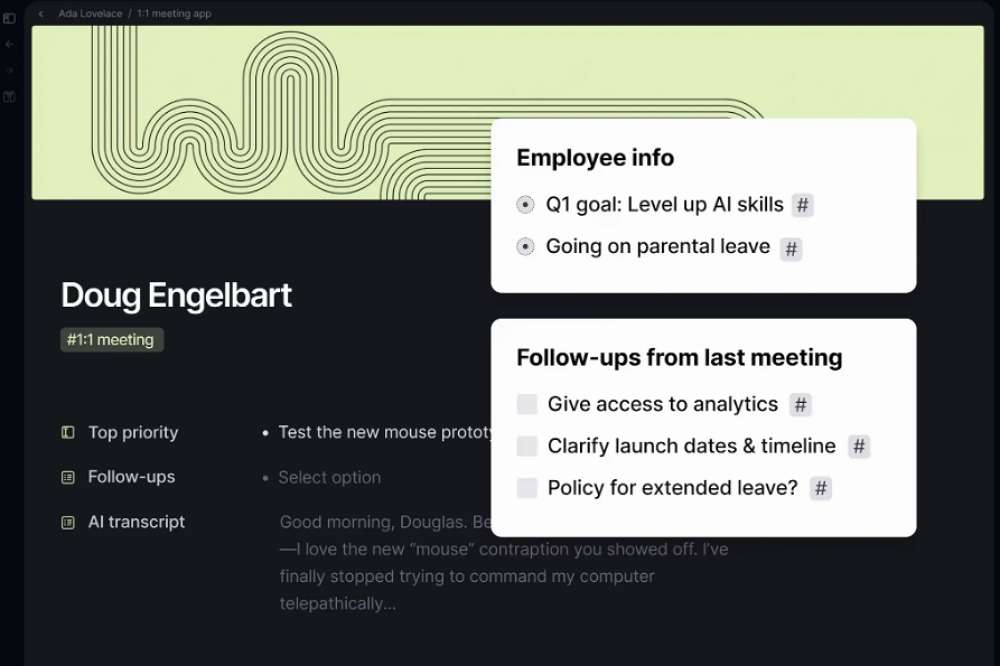
Tana is a next-generation “command line for thought” that combines the fluidity of outliners like Workflowy with the power of databases. It uses “super-tags” to turn any node into a structured data object, making it a formidable notebooklm competitor for managing complex information.
Key Features:
- SuperTags: Apply customizable tags that imbue notes with specific fields, relations, and views (e.g., tagging a note as #person auto-adds fields for email, company).
- Live Search & Queries: Create real-time, saved searches that aggregate information from across your workspace based on tags and fields.
- Daily Notes on Steroids: Each day’s note becomes a powerful launchpad, integrated with all your structured data.
- Extreme Flexibility: Can model anything from simple checklists to sophisticated project management systems.
Pros:
✔ Unparalleled power for modeling complex systems and relationships.
✔ Deeply integrated daily note workflow enhances context.
✔ Query-based views provide dynamic insights into your data.
Cons:
✘ Significant learning curve due to its unique paradigm.
✘ Currently web-only, which may limit offline access for some.
User Comment: “Tana is where I go when my thinking outgrows other tools. It’s not just for taking notes—it’s for building a living system of my work. For structured analysis, it’s the ultimate notebooklm alternative.“
5. Roam Research — Best for Networked Thought
Supported Systems: Web.
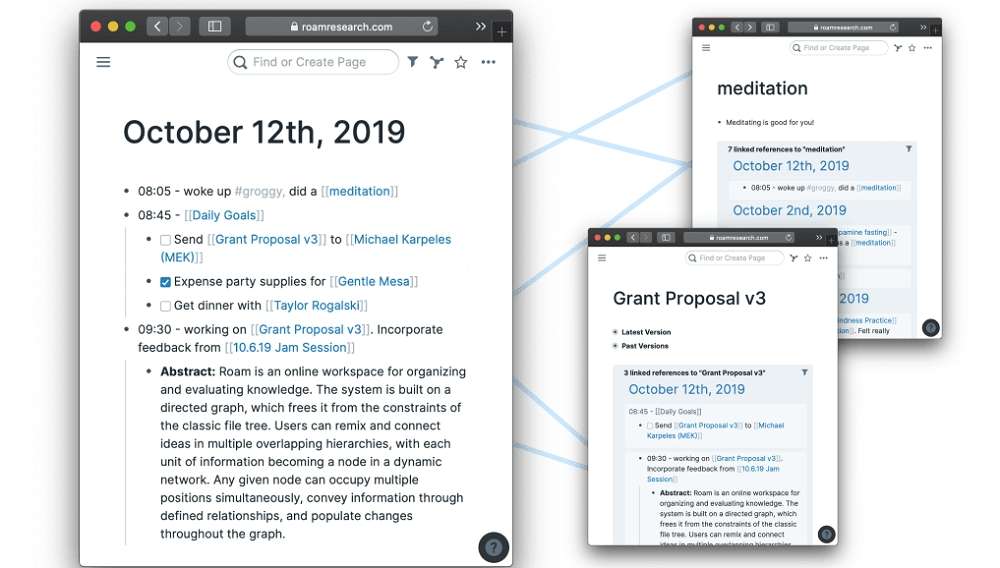
Roam Research pioneered the concept of “note-taking as a network” with its focus on bi-directional linking and the “daily notes” page. It’s designed for connecting disparate ideas and is a classic among alternatives to notebooklm for academics and nonlinear thinkers.
Key Features:
- Non-Linear Structure: Every page and block is a first-class citizen that can be linked and referenced anywhere.
- Bi-Directional Links: Automatically see all notes that link back to your current note, revealing unexpected connections.
- Daily Notes Protocol: A central, dated page for daily logging that encourages consistent use.
- Querying: Use built-in queries to dynamically pull blocks from across your graph based on tags or links.
Pros:
✔ Exceptional for cultivating serendipitous discovery and idea synthesis.
✔ The graph overview is a powerful visual tool for understanding your knowledge landscape.
✔ Frictionless linking encourages connective thinking.
Cons:
✘ Can become visually chaotic with extensive use.
✘ Pricing is higher than many competitors, targeting a professional/academic audience.
Expert Comment: “Roam isn’t a note-taking app; it’s a thought-tangling workshop. It’s less about querying documents like NotebookLM and more about growing a garden of interconnected ideas where the value is in the links between the notes.“
6. Evernote AI — Best for Traditional Note-Taking & Multi-Format Storage
Supported Systems: Web, Windows, macOS, iOS, Android.
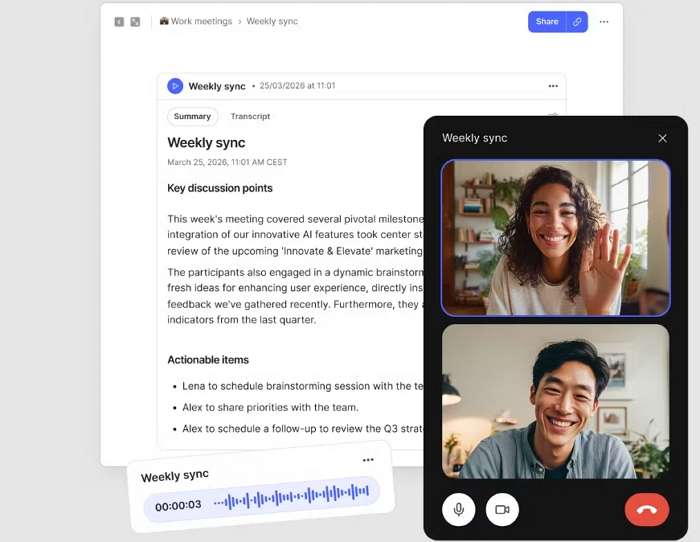
The veteran note-taking app has aggressively integrated AI to modernize its offering. Evernote AI enhances its core strength—reliable, multi-format note storage—with smart features, making it a familiar yet upgraded notebooklm alternative for long-time users.
Key Features:
- AI Note Cleanup: Automatically formats messy notes, creating headings and bullet points from clumped text.
- AI Search: Finds text within images and handwritten notes, and answers natural language questions about your notes.
- Contextual Task Suggestions: Analyzes your notes to suggest actionable to-do items.
- Massive Ecosystem Integration: Unmatched in its ability to capture web clips, emails, and scans into a searchable repository.
Pros:
✔ Industry-leading capture and organization of diverse content types (PDFs, images, web clips).
✔ Reliable, cross-platform sync and a well-established feature set.
✔ AI features are practical and focused on cleaning up and finding existing information.
Cons:
✘ Some advanced AI features are locked behind higher-tier subscriptions.
User Comment: “Evernote is my digital filing cabinet. The new AI features, especially the search that reads my handwriting in scanned notebooks, feel like magic. It’s the most practical alternative to notebooklm for someone with a decade’s worth of notes to manage.“
7. Saner.AI — Best Lightweight Modern AI Notebook
Supported Systems: Web.
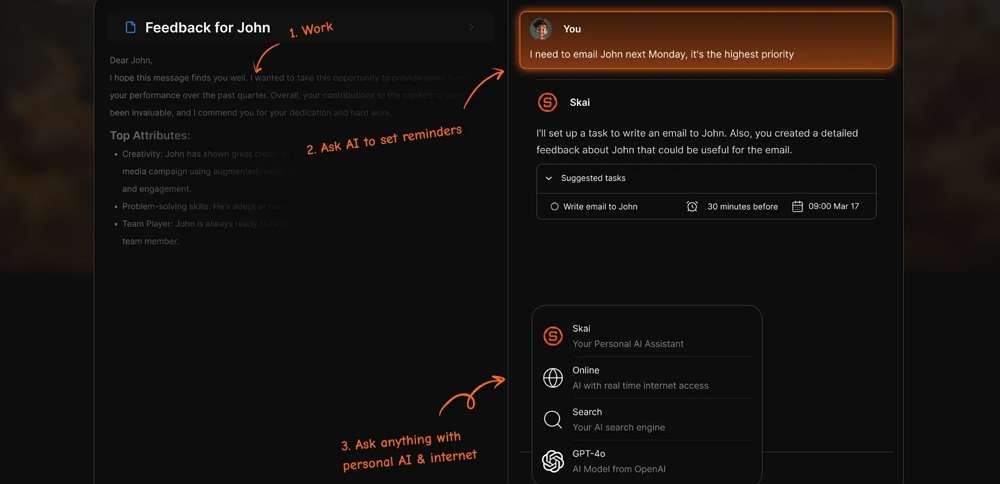
Saner.AI is a minimalist, fast AI notebook designed for quick thinking and organization. It emphasizes reducing friction between having an idea and capturing/processing it with AI, presenting itself as a streamlined notebooklm alternative.
Key Features:
- Blazing-Fast AI Actions: One-click buttons to summarize, expand, simplify, or extract action items from any note.
- Smart Lists: Automatically categorizes notes into dynamic lists (like “Action Items,” “Ideas,” “Questions”) using AI.
- Clean, Focused Interface: A no-frills UI that avoids complexity and promotes focus.
- Quick Capture: Designed for getting thoughts out and processed with minimal steps.
Pros:
✔ Extremely low friction for capturing and immediately processing ideas with AI.
✔ The “Smart Lists” feature provides automatic, useful organization.
✔ Ideal for users who want AI assistance without managing a complex knowledge base.
✘ Lacks the depth of features for long-form content or complex project management.
Cons:
✘ Being web-only and newer, it has a smaller ecosystem and integration network.
Expert Comment: “Saner.AI is for the person who thinks, ‘I just want to write something and hit a button to make it better.’ It distills the AI-augmented note-taking concept down to its essence—speed and utility—making it a superb lightweight notebooklm alternative.“
FAQs about NotebookLM Alternatives
Q1: What is the main reason to look for NotebookLM alternatives?
A: The main reasons are the need for more comprehensive knowledge management features (like linking, databases, or graphs), better integration with existing workflows, stronger data privacy controls, or tools that go beyond Q&A with documents to include project management, automated organization, or networked thought.
Q2: Are there any completely free NotebookLM alternatives?
A: Yes, but with caveats. Obsidian is free for personal use, though you supply and pay for your own AI API credits if using AI plugins. Notion, Mem, Tana, Roam, and others offer free tiers with limitations on features, AI usage, or storage. Always check the latest pricing plans.
Q3: Which alternative is best for privacy-conscious users?
A: Obsidian is the standout choice. Your data stays as local files on your device, and you can configure AI plugins to use local models (like Ollama) or your own API keys without sharing data with the app’s developers.
Q4: Can any alternative match NotebookLM’s source-grounded Q&A feature?
A: Several tools approach this differently. Notion AI can Q&A across your workspace. Mem and Evernote AI can search and answer questions from all your notes. However, the specific interface of “upload documents and chat only about them” is a unique NotebookLM design. Tools like Obsidian with plugins can replicate this functionality within your private vault.
Q5: I’m a student/researcher. Which tool should I choose?
A: For managing vast research literature and forming connections, Obsidian or Roam Research are powerful. If you need to collaborate and share knowledge with a team, Notion AI is excellent. For quickly summarizing papers and extracting key points, Saner.AI or even NotebookLM itself can be very effective.
Conclusion
The landscape of AI-augmented note-taking is rich and diverse. While NotebookLM excels at document-focused dialogue, the best notebooklm alternatives offer wider ecosystems, deeper organizational paradigms, and greater control over your data. Your choice ultimately hinges on your primary goal: Is it seamless collaboration (Notion AI), ultimate privacy (Obsidian), automated organization (Mem), structured thinking (Tana), networked ideas (Roam), reliable storage (Evernote AI), or sheer speed (Saner.AI)? By aligning the tool’s core strength with your workflow’s demands, you can select an alternative to google notebooklm that doesn’t just store your ideas but actively helps them grow.
If your specific need is to find tools that share NotebookLM’s strength in generating knowledge but excel specifically in audio output, our comparison of the best AI Apps Like NotebookLM with Audio Output provides a targeted analysis.

 English